
Preview


Description
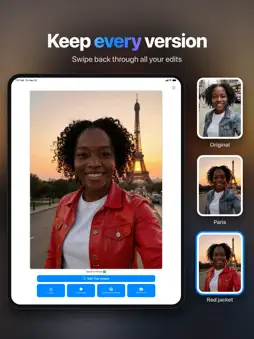
Edit your photos by describing what you want. Type "add sunset lighting" or "make it look like an oil painting," and AI Photo Editing does the rest. No sliders, layers, or editing skills required. NATURAL LANGUAGE EDITING Describe your idea in plain English: "remove the people in the background," "make it look like a painting," or "put me on a beach." The AI understands what you mean and creates the edit, usually within seconds. Not sure where to start? Tap one of the ideas in the prompt box. PROMPT ENHANCER Not sure how to phrase it? Turn on the Prompt Enhancer and tap a style: Photorealistic, Painting, Anime, Comic, Pixel Art, Dramatic, New Scene, or Auto Crop. It adds the photography language that gets better results from shorter prompts. THREE AI MODES Standard handles everyday edits for 1 credit. Fast returns your edit in a few seconds, for 1 credit or unlimited with Pro (fair use), when you want to try ideas quickly. Genius uses a more powerful model for the tricky ones, for 2 credits. COMPARE AND REFINE • Swipe between your original and every version you create • Try different prompts to explore variations • Keep refining until it's exactly right • Zoom in to check the details MADE FOR IPHONE AND IPAD On iPad, your photo sits beside the controls in landscape and gets a roomy single column in portrait. On iPhone, your prompt and its buttons stay in view above the keyboard. SAVED AUTOMATICALLY Your edits are saved to their own album in the Photos app, so every version is easy to find and keep editing. Prefer to save by hand? Turn auto-save off. SHARP RESULTS Built-in upscaling keeps your edits crisp and detailed. SHARE AT FULL QUALITY Share any edit straight to Messages, social apps, or anywhere else, at the same full resolution you save. Location details are removed from shared photos. YOUR PHOTOS STAY PRIVATE We don't keep your photos on our servers. They're used only to create your edit, and your results live in your own Photos library. You can delete your account anytime from Settings. START FREE, THEN GO PRO Sign in with Apple and get free edits to start. Pro gives you unlimited Fast edits (fair use: 200 a day) and 30 Pro credits a week for Standard and Genius, billed weekly or yearly. Pro credits refill every 7 days from when you subscribe; unused ones don't carry over. Credits you've bought never expire and stay with your Apple account across devices and reinstalls. No ads. Pro renews automatically until you cancel, at least 24 hours before the end of the period, in your Apple Account settings. JOIN THE COMMUNITY Share prompts, get help, and see what others are making. You'll find the invite in Settings. GREAT FOR • Restoring and colorizing old photos • Fixing lighting and color in seconds • Turning photos into art with a single sentence • Trying out different moods, styles, and settings • Quick touch-ups before you post • Cleaning up backgrounds and distractions Whether you're creating for social media, bringing old memories to life, or just having fun, AI Photo Editing puts powerful editing into plain words. Terms of Use: https://ai-editor.app/terms/ Privacy Policy: https://ai-editor.app/privacy-policy/
What's New
Version 2.8 2026-10-28
New: Pro • Unlimited Fast edits (fair use), and 30 Pro credits a week for Standard and Genius • Weekly or yearly; cancel any time in your Apple Account settings... Technical Analysis
Package Overview Basic metadata
Bundle ID
ai-team.ai-photo-editing Current Version 2.8
Minimum iOS 16.4
Package Size App Store Size
Package Metadata 1 / 6 version records
Detailed binary, privacy manifest, framework, and Info.plist results have not been indexed for this package yet. The verified App Store and archive metadata above remains available.
Developer Information
Known Version Records
1 version record with stored package metadata • 6 known version records
Stored metadata does not guarantee a package is currently available to download.
| Details | Version / IDs | Version date | Action |
|---|---|---|---|
| 67.3 MB | v2.4 App Store ID: 881147783Build: 2.4 | 2026-09-02 19:09:33 | Get Version |
| Not archived | App Store ID: 881027010 | Unknown | Request Version |
| Not archived | App Store ID: 880961475 | Unknown | Request Version |
| Not archived | App Store ID: 880899913 | Unknown | Request Version |
| Not archived | App Store ID: 880881261 | Unknown | Request Version |
| Not archived | App Store ID: 880740603 | Unknown | Request Version |