Preview


Description
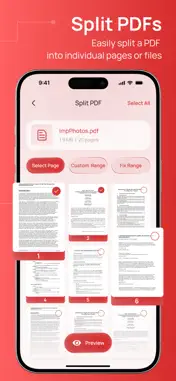
Welcome to PDF Converter App, your all-in-one solution for converting, managing, and organizing documents with speed, simplicity, and powerful AI-driven performance. Whether you need to convert images to PDF, PDF to Word, Word to PDF, Excel to PDF, or compress and manage files, this app is designed to make document handling effortless for students, professionals, businesses, and everyday users. With a clean interface and lightning-fast processing, PDF Converter App helps you convert files in just a few taps. No complicated steps, no technical knowledge required — simply upload your file, choose the format, and let the app handle the rest. From office documents and scanned notes to photos and presentations, everything can be transformed into high-quality PDFs or editable formats instantly. The app supports multiple file formats, allowing you to convert documents between PDF, DOCX, XLSX, PPT, TXT, JPG, PNG, and more. Whether you’re preparing professional reports, sharing school assignments, editing contracts, or organizing personal files, PDF Converter App provides a smooth and reliable experience. Key Features: • Convert images to PDF instantly • Convert PDF to Word and Word to PDF • Excel to PDF and PDF to Excel conversion • PowerPoint to PDF support • Compress PDF files without losing quality • Merge multiple PDFs into one document • Split PDF pages easily • Fast file sharing and export options • High-quality document output • User-friendly and intuitive design • Secure file processing and privacy protection • Lightweight app with powerful performance PDF Converter App is perfect for: • Students managing assignments and notes • Business professionals handling reports and contracts • Office workers converting daily documents • Freelancers sharing project files • Anyone who works with PDFs and documents regularly Need to scan documents? Easily turn photos into clean PDF files using your device camera or gallery images. You can also organize pages, rename files, and store important documents directly inside the app for easy access anytime. Privacy and security are our priority. Your files are processed securely, and we continuously improve our systems to ensure safe and reliable document conversion. Whether you’re converting confidential business files or personal documents, your data is handled with care. The app is optimized for productivity and convenience. Instead of using multiple tools for different tasks, PDF Converter App combines everything into one powerful platform. Save time, reduce hassle, and work smarter with professional-grade document tools available right on your phone. Why users love PDF Converter App: • Fast and reliable conversions • Professional-quality PDF output • Simple and modern interface • Multiple conversion tools in one app • Smooth performance on all devices • Great for work, study, and personal use Whether you need to convert a single image into a PDF, edit office documents, compress large files for sharing, or combine multiple pages into one organized document, PDF Converter App is built to help you get things done quickly and efficiently. Subscription Terms: The app is free to download and use. Some enhanced features are available through optional in-app purchases. If you choose to make a purchase, the payment will be charged to your iTunes account at confirmation. Subscriptions automatically renew for the same price and duration unless auto-renew is turned off at least 24 hours before the current billing period ends. You can manage or cancel your subscription anytime through your iTunes Account Settings. If your subscription includes a free trial, you may cancel it at any time in your iTunes Account Settings. Be sure to cancel at least 24 hours before the trial period ends to avoid being charged. Privacy Policy: https://www.aiappdevs.com/privacy-policy/ Terms of Use: https://www.aiappdevs.com/terms-of-use-eula/
What's New
Version 1.1 2026-10-08
New Features & Enhancements: 1. High-Speed Conversion: Enhanced engine for faster Word, Excel, and image to PDF conversions. 2. Improved Document Scanner: Sha...New Features & Enhancements: 1. High-Speed Conversion: Enhanced engine for faster Word, Excel, and image to PDF conversions. 2. Improved Document Scanner: Sharper photo-to-PDF scanning quality Bug Fixes & Stability: 1. Performance and stability optimizations for a smoother overall app experience. Technical Analysis
Package Overview Basic metadata
Bundle ID
com.aiappsdev.convertfilespdf Current Version 1.1
Minimum iOS 26.0
Package Size App Store Size
Package Metadata 0 / 1 version records
Detailed binary, privacy manifest, framework, and Info.plist results have not been indexed for this package yet. The verified App Store and archive metadata above remains available.
Known Version Records
0 version records with stored package metadata • 1 known version records
Stored metadata does not guarantee a package is currently available to download.
| Details | Version / IDs | Version date | Action |
|---|---|---|---|
| Not archived | App Store ID: 882562798 | Unknown | Request Version |