Preview







Description
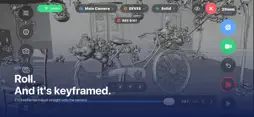
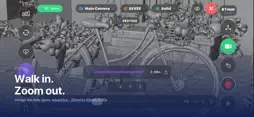
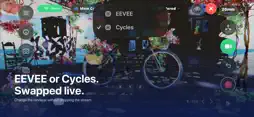
ViRender turns your iPhone or iPad into a live, handheld cinema camera for Blender. Point your phone and the Blender camera goes where you point it. Walk the shot, tilt, pan, push in — the scene streams back to your screen in real time, and every move is recorded straight onto the camera's keyframes. No motion-capture suit, no trackers, no dongles, and no export step. Just Blender on your computer and ViRender in your hand, on the same Wi-Fi or a USB cable. A Blender add-on comes with it: one zip, pure Python, no dependencies. It puts a QR code in Blender's sidebar — scan it and you're connected. HOW IT WORKS • Scan the QR code in Blender's ViRender panel to connect. • Move your phone. Gyro and 6DoF tracking drive the Blender camera one to one. • Roll to record. The move lands as ordinary camera keyframes you can retime, smooth and edit like anything else. CAMERA IN YOUR HAND • Live viewport streaming up to 120 fps. • Focal-length presets — 18, 24, 35, 50, 85, 135, 200mm — plus a continuous zoom you drag with your thumb. • Full-frame, Super 35 and Micro Four Thirds sensor modes, so a 35 means what you expect. • Depth of field: focus distance and f-stop, applied to Blender's own camera. • Vertigo dolly zoom, solved live — track in while the lens pulls out. • Steady-cam smoothing with the latency it costs reported on screen. • PTZ joysticks and Bluetooth game-controller support for tripod-style moves. A REAL DIRECTOR'S MONITOR • Live stats: resolution, fps, focal length, field of view, frame, ping and tracking state. • Focus peaking, zebras, histogram, framing guides and a 2× punch-in. • Clean view hides every overlay with one tap. • Switch viewport shading — Wireframe, Solid, Material Preview, Rendered — and swap between EEVEE and Cycles, all from the phone. SCENE CONTROL • Pick which Blender camera you're driving and switch mid-shot. • Scrub the timeline and run playback with Blender in step. • Fire a render from the phone, watch the progress, and pull the finished frame back to the glass. • Save camera presets and keep a shot list as you work. STAYS ON YOUR NETWORK Everything runs between your phone and your computer over your own Wi-Fi or a USB cable. No account, no cloud, nothing uploaded. REQUIRES Blender 4.x or 5.x on Windows, macOS or Linux, with the included ViRender add-on. Also available: ViRender Team, a multi-operator build where several phones drive one Blender session at once. Questions or trouble getting connected? Write to [email protected].
Technical Analysis
Package Overview Basic metadata
Bundle ID
com.virender.blender Current Version 1.6
Minimum iOS 16.0
Package Size App Store Size
Package Metadata 0 / 0 version records
Detailed binary, privacy manifest, framework, and Info.plist results have not been indexed for this package yet. The verified App Store and archive metadata above remains available.
Price History (USA store)
2 recorded price change points. These are historical observations, not a guarantee of the current price.
| Recorded at | Price | Currency |
|---|---|---|
| 14.99 | USD | |
| 9.99 | USD |
Developer Information
Known Version Records
0 version records with stored package metadata
Stored metadata does not guarantee a package is currently available to download.
| Details | Version / IDs | Version date | Action |
|---|