Preview


Description
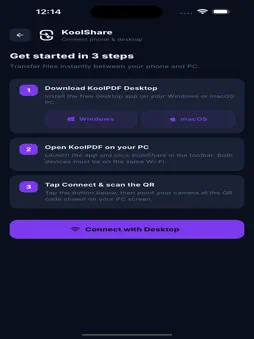
Transform the way you work with PDFs. KoolPDF is a powerful all-in-one PDF solution that helps you edit, convert, organize, protect, and share documents from anywhere. Whether you're a student, professional, business owner, or everyday user, KoolPDF provides everything you need to handle PDFs efficiently. With 22+ powerful PDF tools, AI-powered automation, OCR text recognition, unlimited file transfer, and clipboard sync, KoolPDF makes document management faster and smarter. PDF TOOLS FOR EVERY NEED Edit and organize your PDF documents with ease. • Merge PDF files • Split PDF documents • Compress PDF size • Remove PDF pages • Extract PDF pages • Repair damaged PDFs • Rotate PDF pages • Add page numbers • Add watermarks • Protect PDF with passwords • Unlock PDF files • Redact sensitive content • Organize and rearrange pages Process documents quickly while maintaining high-quality output. CONVERT FILES TO AND FROM PDF Convert documents and images in seconds. Supported conversions include: • JPG to PDF • PNG to PDF • Word to PDF • Excel to PDF • PowerPoint to PDF • PDF to JPG • PDF to PNG • PDF to Word • PDF to Excel • PDF to PowerPoint Preserve formatting and create professional documents effortlessly. OCR – EXTRACT TEXT FROM IMAGES & SCANNED PDFS Turn scanned documents into editable text. OCR helps you: • Extract text from images • Convert scanned PDFs into editable documents • Create searchable PDFs • Digitize paper documents • Save time on manual typing Perfect for invoices, notes, contracts, receipts, and more. KOOLAI – YOUR AI PDF ASSISTANT Work smarter with AI. KoolAI lets you perform complex PDF actions using simple natural language prompts. Examples: "Merge all PDF files." "Compress this PDF below 5 MB." "Protect this document with a password." "Convert this PDF to Word." "Add page numbers and watermark." Simply describe what you need, and KoolAI handles the rest. KOOLSHARE – UNLIMITED FILE TRANSFER Transfer files between your phone and computer instantly. No cables. No sign-up. No size limits. Features include: • Mobile to desktop transfer • Desktop to mobile transfer • Unlimited file size support • Fast wireless transfers • Secure local sharing • Send photos, videos, PDFs, and documents Move files seamlessly across devices whenever you need them. CLIPBOARD SYNC Copy on one device and paste on another. Clipboard Sync allows you to: • Copy text on mobile and paste on desktop • Transfer links instantly • Move notes between devices • Improve productivity across platforms Stay connected and work without interruptions. FAST, SECURE & EASY TO USE KoolPDF is designed to be simple for everyone while providing professional-grade PDF capabilities. Why users love KoolPDF: • 22+ PDF tools in one app • AI-powered PDF automation • Fast PDF conversions • OCR text recognition • Unlimited file sharing • Clipboard synchronization • Secure document processing • Clean and intuitive interface • High-quality output • Regular feature updates PERFECT FOR • Students • Teachers • Business professionals • Freelancers • Office workers • Remote teams • Content creators • Small businesses Download KoolPDF today and experience a smarter way to edit, convert, compress, organize, protect, share, and automate your PDF workflows.
Technical Analysis
Package Overview Basic metadata
Bundle ID
com.agevole.koolpdf Current Version 1.0.2
Minimum iOS 15.5
Package Size App Store Size
Package Metadata 0 / 1 version records
Detailed binary, privacy manifest, framework, and Info.plist results have not been indexed for this package yet. The verified App Store and archive metadata above remains available.
Developer Information
Known Version Records
0 version records with stored package metadata • 1 known version records
Stored metadata does not guarantee a package is currently available to download.
| Details | Version / IDs | Version date | Action |
|---|---|---|---|
| Not archived | App Store ID: 886680286 | Unknown | Request Version |