
Preview



Description
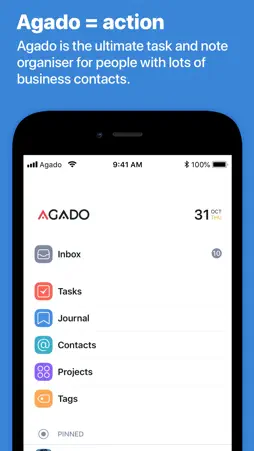
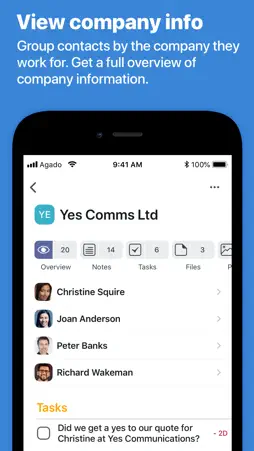
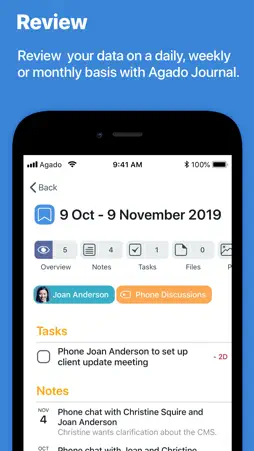
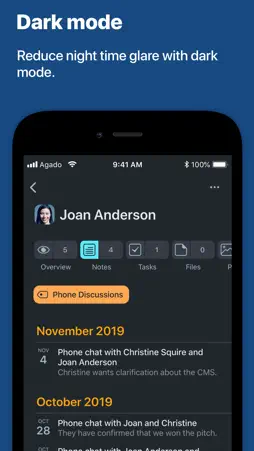
Agado can link tasks, notes and files to your iPhone contacts. With Agado, when someone calls you, every note, task or document that's relevant to that person can instantly be pulled up and referred to in your conversation. As a Project management tool, Agado tells you what to do and when. Even when you’re offline and on an aeroplane, all your project information is fully accessible. HERE’S HOW AGADO WORKS 1. AGADO WORKS WITH YOUR IPHONE CONTACTS Agado works with the Contacts database on your iPhone. When you add a new contact into your iPhone, it automatically becomes available in Agado 2. LINK TASKS, NOTES AND FILES TO IPHONE CONTACTS Agado can link tasks, documents, meeting notes, emails and photos to your iPhone contacts. When someone important calls, Agado can bring up key information relating to that person. 3. INSTANT RESULTS WITH AGADO ‘QUICKSEARCH’ No matter where you are in the app, pulling down the screen and letting go brings up Agado ‘QuickSearch’. Typing in a search term will instantly bring up all the information you’re searching for. ‘QuickSearch’ also works when you’re offline and not on the Net. 4. LINK YOUR CONTACTS TO THE COMPANIES THEY WORK FOR Agado can link your contacts to the companies they work for. It also brings up all the information linked to that company. 5. BREAK DOWN YOUR PROJECTS AND TASKS With Agado you can break your Projects down into smaller sub-projects. You can also split complex tasks into sub-tasks and track them separately. 6. IMPORT WEB PAGES INTO AGADO If you find an article or an idea on the web, you can place it into Agado with the Safari share extension. 7. IMPORT FILES, DOCUMENTS AND VIDEOS INTO AGADO Using the iPhone share extension, you can export files from other apps into Agado. All types of files like documents, photos, videos and audio can be exported into Agado and linked to your Contacts, Projects and Tags. These are available offline even when you’re on a plane with the Wi-Fi turned off. 8. FILTER YOUR RESULTS At the base of the screen, each project has a filter that lets you break down your information by the Contacts, Projects and Tags that are linked to that Project. 9. AGADO CREATES AN AUTOMATIC JOURNAL As you create a note or a task, it automatically goes into Agado’s Journal. You can use this Journal to review your data on a daily, weekly or monthly basis. 10. PIN IMPORTANT ITEMS TO THE HOME PAGE If you need quick access to key information, you can pin your key Contacts, Projects and Tags to Agado’s home page. 8. MANAGE YOUR IMPORTANT EMAILS If you use the Airmail or Spark email apps, you can export key emails into Agado using the iPhone Sharing tool. Once in Agado, you can link these emails to your iPhone contacts, Projects and Tags. Each email exported to Agado has a link that takes you back to the original email in Airmail or Spark. That makes them easier to reply to. 12. DOCUMENT SCANNER Agado’s document scanner lets you scan a business card and link it to that contact. It lets you track expenses by scanning receipts. It can also digitise and organise your paper documents.
What's New
Version 1.2.4 2020-04-07
App stability improvements and bug fixes Technical Analysis
Package Overview Package analysis available
Bundle ID
com.agadoapps.agado.iphone Current Version 1.2.4
Minimum iOS 12.4
Package Size App Store Size
Package Metadata 1 / 7 version records
Ensembles
org.cocoapods.Ensembles v2.7.0iOS 8.0+1.14 MB
MBProgressHUD
org.cocoapods.MBProgressHUD v1.1.0iOS 8.0+172.61 KB
SSZipArchive
org.cocoapods.SSZipArchive v2.2.2iOS 8.0+256.76 KB
Known Version Records
1 version record with stored package metadata • 7 known version records
Stored metadata does not guarantee a package is currently available to download.
| Details | Version / IDs | Version date | Action |
|---|---|---|---|
 6.88 MB | v1.2.4 App Store ID: 835428122Build: 0.008 | 2020-04-07 00:10:22 | Get Version |
| Not archived | App Store ID: 835377427 | Unknown | Request Version |
| Not archived | App Store ID: 834069494 | Unknown | Request Version |
| Not archived | App Store ID: 833709345 | Unknown | Request Version |
| Not archived | App Store ID: 833592068 | Unknown | Request Version |
| Not archived | App Store ID: 833449927 | Unknown | Request Version |
| Not archived | App Store ID: 830500424 | Unknown | Request Version |