
Preview


Description
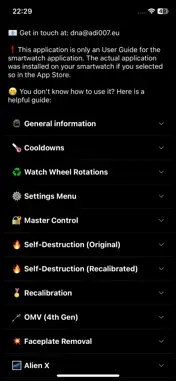
• Turn into an Alien using your Apple Watch! Open the application and become your favourite Hero! [ ! ] It is highly recommended to download the smartphone version of the app. Through it, you will find all the available instructions and functions. Only a few of them are listed below: • General information: - You can select the Hero either by turning the physical wheel of your watch, or by tapping on the screen on the left or right side. - When it is discharged, having a red screen, it will also show you the current time if that setting is activated in app's settings. - You can open the Hero selection by tapping on the middle of the screen. • Watch Wheel Rotations / Touch sequences: - To activate / deactivate some features, you will need to either perform a clockwise / counterclockwise sequence of watch wheel rotations, OR a sequence of taps on the left / right side of the screen. - "Left" means you have to turn your watch wheel down, or touch the screen on the left side. You have to do the opposite for "Right". - These sequences can be used only in the main screen of the app (the one before opening the Hero selection). • Master Control: - In Original / Classic style: You will have no cooldowns, no waiting times and you will have access to all 25 Heroes. - In Recalibrated style: when Master Control is activated, you will be able to use the ultimate evolved forms of the Aliens. - Activating sequence: Left-Right-Left-Right-Left-Right-Left - Deactivating sequence: Left-Left-Left-Right-Right-Right-Left • Self-Destruction mode: - When self-destruction mode is activated, orange circular lines begin to appear on the screen. - Each circular line represents a level of self-destruction. - A total of 5 circular lines can be loaded in total (so there are 5 levels of self-destruction). - One level of self-destruction will advance every 30 seconds. - Once the maximum level of self-destruction has been reached (level 5), the watch will self-destruct. - Activation sequence: randomly perform 15 watch wheel rotations or 15 taps on the screen, regardless of direction (left / right). - Each level of self-destruction has its own cancellation sequence, so you need to know what level of self-destruction the watch is in, depending on the number of circular lines that appear on the screen (example: 2 circular lines means level 2 of self-destruction). - To cancel a self-destruction level, the required sequence is: "Right" as many times as levels of self-destruction you have, and then continuously "Left" until the level of self-destruction is removed. • Recalibration: - This function is activated by tapping the main screen, but only if the user meets all the conditions below: 1. Master Control is activated. 2. The user turned into an alien at least 10 times. 3. The user has reached at least level 2 of self-destruction in the past and then canceled the self-destruct sequence. [ ! ] More features are available, you can read detailed information about them in the User Guide on the Phone App: • DNA Scanner ... • Repair Genetic DNA ... • OMV (4th Gen) ... • Settings Menu ... • Custom Playlist ... • Gesture Controls ... • Assistant Hologram ... • Faceplate Removal ... • EON ... • GAX ... [ ! ] Read the rest of the information on the smartphone application version. [ ! ] The Apple Watch application is a game made for fun. Unfortunately, it can't turn you into an Alien. [ ! ] This iOS (Phone) application does not contain the game itself. This app contains only the information / user guide to learn how to play the game on your Apple Watch.
What's New
Version 2.4.0 2026-10-19
# The most dangerous villain in all galaxies has arrived. Once his DNA takes over the watch, the Alien Selection opens with the villain ready to be used. • Ente... Technical Analysis
Package Overview Basic metadata
Bundle ID
eu.adi007.trx Current Version 2.4.0
Minimum iOS 15.6
Package Size App Store Size
Package Metadata 0 / 13 version records
Detailed binary, privacy manifest, framework, and Info.plist results have not been indexed for this package yet. The verified App Store and archive metadata above remains available.
Developer Information
Known Version Records
0 version records with stored package metadata • 13 known version records
Stored metadata does not guarantee a package is currently available to download.
| Details | Version / IDs | Version date | Action |
|---|---|---|---|
| Not archived | v2.1.0 App Store ID: 886608511Build: 2.1.0 | 2026-06-06 22:26:45 | Paid / Arcade |
| Not archived | v2.0.0 App Store ID: 886543132Build: 2.0.0 | 2026-06-05 00:53:46 | Paid / Arcade |
| Not archived | v1.9.0 App Store ID: 886080637Build: 1.9.0 | 2026-05-25 02:08:25 | Paid / Arcade |
| Not archived | v1.8.0 App Store ID: 885811364Build: 1.8.0 | 2026-05-18 23:46:21 | Paid / Arcade |
| Not archived | v1.7.1 App Store ID: 885436436Build: 1.7.1 | 2026-05-09 18:03:42 | Paid / Arcade |
| Not archived | v1.7.0 App Store ID: 885399199Build: 1.7.0 | 2026-05-07 23:18:38 | Paid / Arcade |
| Not archived | v1.6.0 App Store ID: 885187109Build: 1.6.0 | 2026-05-03 03:58:32 | Paid / Arcade |
| Not archived | v1.5.0 App Store ID: 884891607Build: 1.5.0 | 2026-04-24 23:08:11 | Paid / Arcade |
| Not archived | v1.4.0 App Store ID: 884697200Build: 1.4.0 | 2026-04-20 21:11:23 | Paid / Arcade |
| Not archived | v1.3.0 App Store ID: 884593127Build: 1.3.0 | 2026-04-16 19:23:01 | Paid / Arcade |
| Not archived | v1.2.0 App Store ID: 884515856Build: 1.2.0 | 2026-04-15 00:42:38 | Paid / Arcade |
| Not archived | v1.1.0 App Store ID: 884357077Build: 1.1.0 | 2026-04-10 21:38:16 | Paid / Arcade |
| Not archived | v1.0.0 App Store ID: 884202225Build: 1.0.0 | 2026-04-08 07:21:27 | Paid / Arcade |