Preview



Description
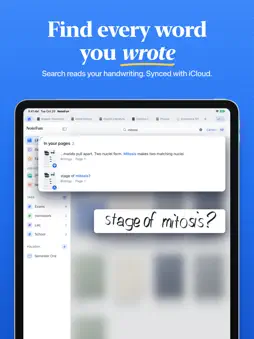
Your notes, docs and PDFs in one app, with an AI tutor on the page. Write by hand, type a doc, mark up a PDF or record a lecture, then turn your pages into flashcards and quizzes. NoteFun is an all-in-one notes app for iPad: notebook, planner, PDF markup, lecture recorder and study tools, together in one library. HANDWRITTEN NOTES THAT FEEL LIKE PAPER • Fountain, ballpoint and brush pens that follow your pressure, plus highlighter, eraser and lasso. • Pencil-only mode, so a resting palm leaves no marks. • Lined, grid, dotted, Cornell and music papers, with covers. • Shapes, text boxes, stickers and a laser pointer for presenting. • Convert handwriting to typed text. DOCS, PDFS AND SCANS • Text Docs: a clean page for typing when you would rather type. • Import PDFs (lecture slides too) and images from Files, then write right on them. • Scan paper pages with the camera. • Whiteboards: one wide surface for brainstorming and diagrams. • Export as PDF, PNG or Markdown. AN AI TUTOR ON THE PAGE • Write a question in your notes, tap Ask, and the answer comes back in ink right under it. • Hint, Explain or Solve: take only as much help as you need, from a math problem to a lecture slide. • Answers can include flowcharts, graphs, tables and labeled drawings, as ink you can move, erase or keep. • Write your question in another language and the tutor answers in that language. LECTURES, RECORDED AND TRANSCRIBED • Record a lecture or meeting while you write. • It is transcribed on your iPad, and the transcript is searchable. STUDY TOOLS • Study Sets: flashcards the tutor makes from your notes. • Practice quizzes written from the pages you choose. • Tape over answers on any page to test yourself. PLANNERS AND TEMPLATES • Monthly and assignment planners, to-do lists, kanban boards, meeting agendas, reading logs and a gratitude journal. FIND ANYTHING • Search finds words in your handwriting, your PDFs and your recordings. • Folders, tags and covers keep every class and project in order. YOUR NOTES, SAFE AND IN SYNC • iCloud sync is on from your first notebook, across all your iPads. • Notebooks are backed up to your own iCloud as you work, and you can restore them. • Lock any notebook with Face ID, Touch ID or a passcode. • No account needed. Your notes stay on your iPad and in your own iCloud, and the AI only sees what you ask about. • Turn AI off for any notebook to keep its pages entirely on your iPad. • Widgets for recent notebooks, quick capture and today's study. CLEAR, FAIR LIMITS Start with 3 notebooks and 5 tutor questions, then 2 more questions every day, for as long as you like. NoteFun Pro removes the notebook limit, adds many more questions every day and allows larger PDF imports. It is billed weekly, monthly or yearly, and you can cancel anytime in Settings. AI can make mistakes. Check important answers. Requires iPadOS 17 or later. Apple Pencil recommended. Terms of Use: https://quillwind.com/notefun/terms/ Privacy Policy: https://quillwind.com/notefun/privacy/
Technical Analysis
Package Overview Basic metadata
Bundle ID
com.notefun.NoteFun Current Version 1.0
Minimum iOS 17.0
Package Size App Store Size
Package Metadata 0 / 0 version records
Detailed binary, privacy manifest, framework, and Info.plist results have not been indexed for this package yet. The verified App Store and archive metadata above remains available.
Developer Information
Known Version Records
0 version records with stored package metadata
Stored metadata does not guarantee a package is currently available to download.
| Details | Version / IDs | Version date | Action |
|---|