
Preview




Description
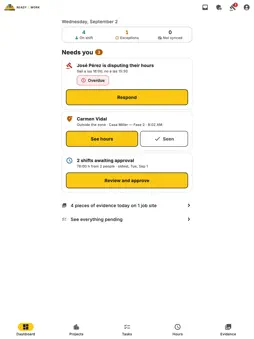
R2W Contractor is the part of Ready2Work for whoever runs the job sites. When you open it, the Dashboard tells you what needs you, most urgent first: disputes, punches outside the zone, hours waiting for approval and who hasn't clocked in. When there's nothing left, it says so. INSTANT ALERTS A notification on your phone when someone on your crew clocks in or out of a job site, even with the app open. Mute it per job site. YOUR JOB SITES AT A GLANCE Each job site shows whether anyone is on site, the week's hours and what's left to review. The detail is split into tabs — summary, hours, evidence and repairs — with the settings kept apart. APPROVE PER PERSON One card per worker with their week and a button to approve their shifts with no issues. Shifts that need a look — over 24 hours, outside the zone, no GPS — are approved one by one. Disputed hours can't be paid out while the dispute is open. If someone forgot to clock out, you see the time they propose and accept it in one tap. CORRECT WITHOUT ERASING An adjustment never overwrites the punch: it creates a new record that references it, with your name on it. The worker always sees who adjusted their hours and can dispute it. TASKS BY JOB SITE Your job sites first, with what's pending and the progress; inside, their tasks. Assign a task to your people as you create it, and they get a notification. GEOFENCE ON THE MAP Each job site with its center, a radius you adjust with your finger, and its end of workday. A punch outside the zone, without GPS or with a mocked location is flagged for you to review; it is never blocked automatically. JOB SITE EVIDENCE One folder per job site with its latest photos and what came in today; inside, large photos with their time, who took them and whether they were inside the zone. A photo imported from the gallery is marked as unverified. ASSIGN THE CREW Add and remove people from a job site, even without signal: it's saved on the phone and sent when service comes back. PERMISSIONS PER COMPANY A supervisor can approve their crew's hours without being able to export the full payroll. Each checkbox says what it allows. EXPORT Reviewed hours to CSV or XLSX, also between any two dates, for the payroll system you already use. Requires a Ready2Work company account.
What's New
Version 3.11.0 2026-11-21
Your company's payroll week, and a new Payroll screen. · Hours follows your company's payroll week (for example, Saturday to Friday), with its cut-off day and ...Your company's payroll week, and a new Payroll screen. · Hours follows your company's payroll week (for example, Saturday to Friday), with its cut-off day and time. · Payroll, from Hours: what goes into each week, per person, with late hours and corrections from past weeks. · Tap "Send to payroll" on a week: what went in is saved, and anything that changes later goes to the next week. Technical Analysis
Package Overview Basic metadata
Bundle ID
com.adandaa.rswcontractor Current Version 3.11.0
Minimum iOS 15.0
Package Size App Store Size
Package Metadata 0 / 0 version records
Detailed binary, privacy manifest, framework, and Info.plist results have not been indexed for this package yet. The verified App Store and archive metadata above remains available.
Developer Information
Known Version Records
0 version records with stored package metadata
Stored metadata does not guarantee a package is currently available to download.
| Details | Version / IDs | Version date | Action |
|---|