Preview







Description
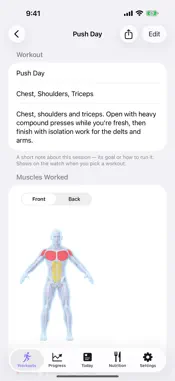
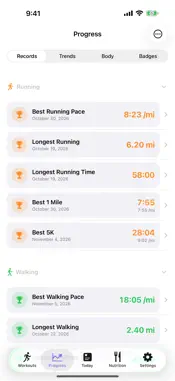
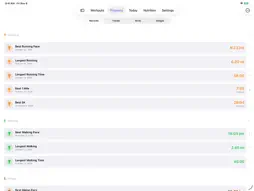
SummitMetrics is a watch-first training app for runners, hikers, lifters, and anyone who wants real metrics without leaving the Apple ecosystem. WATCH-FIRST, NATIVE EVERYWHERE Apple HIG design, SwiftUI throughout, no third-party SDKs. Start a workout on your Apple Watch with one tap, see live metrics on iPhone via the Live Activity, and browse your full history on macOS. ACTIVITIES • Walk, Run, Hike — GPS route, splits, pace, heart rate zones • Strength Training — auto-detect or template walk-through, set-by-set • Outdoor Cycle, Kayak, Ski — full GPS + HR • Pool Swim, Open Water Swim STRENGTH SUITE Build templates on iPhone or macOS. Walk through them on the watch — sets, reps, rest timer, suggested weights from your last session, form cues, and a muscle diagram of what each exercise hits. Track 1RM and volume per exercise over time. ROUTES + NAVIGATION Import GPX routes from Strava, Gaia, CalTopo, or build them in-app. Get turn-by-turn cues and waypoint alerts on the watch during outdoor workouts. Routes sync to the watch via iCloud. FITNESS DASHBOARD (requires SummitMetrics Pro) Strain, Recovery, Sleep, and Readiness dials with 30-day drilldowns. Plus VO₂ Max with age-banded classification. Every formula spelled out in plain English in the detail views — no black box. PERSONAL RECORDS (requires SummitMetrics Pro) 1K, 5K, 10K, half, marathon best splits. All-time 1RM tracking. Tap any record to see which workout earned it. STRAVA + APPLE HEALTH Upload workouts to Strava automatically (optional). Apple Health is the source of truth — SummitMetrics reads and writes there, never to its own servers. PRIVACY No analytics. No ad tracking. No accounts. No servers. Your data stays on your devices, in Apple Health, and in your private iCloud. WHAT'S FREE Workout recording, heart rate zones, live workout mirror, and basic history are available without a subscription. SUMMITMETRICS PRO Unlocks the Fitness dashboard, Personal Records, Routes + navigation, the full Strength suite, and the SummitMetrics macOS companion app. One purchase covers iPhone, macOS, and Apple Watch via Universal Purchase. • Monthly: $4.99 per month, auto-renewing • Annual: $29.99 per year, auto-renewing (includes a 14-day free trial for new subscribers) • Lifetime: $79.99 one-time purchase (no auto-renewal) Subscriptions auto-renew at the end of each billing period unless cancelled at least 24 hours before the period ends. Manage or cancel in Apple ID Settings → Subscriptions. Privacy Policy: https://summitmetrics.carnagey.io/privacy Terms of Use (EULA): https://www.apple.com/legal/internet-services/itunes/dev/stdeula/
What's New
Version 1.4.0 2026-11-18
Ski trail maps, workouts with friends, gear tracking, and a lot more for lifting. SKI - Trail maps with runs, lifts, snow and forest, and each run named. Built...Ski trail maps, workouts with friends, gear tracking, and a lot more for lifting. SKI - Trail maps with runs, lifts, snow and forest, and each run named. Built-in maps for Angel Fire, Ski Apache, Breckenridge, Copper, Keystone and Sunshine, plus a Ski tile in the Library. - Ski days show the resort name and skip mile splits. FRIENDS - Add friends who were there to a workout. They get an alert and can save their own copy, and you show up together on one card. - See friends' badges, personal records and finished challenges in the feed. - Send a workout template or planned route to friends, or browse theirs from their profile and add it. - See your own workouts as friends see them. - iPad: feed list and details side by side. LIFTING - Free Lift on iPhone: pick exercises from the catalog and log sets. - Record a gym workout on iPhone page by page, as on the watch. See the set after next, supersets and drop sets. - Today's Pick marks the suggested template on the Gym screen. - Exercise icons on templates and gym workouts, with volume, sets and reps. - Bodyweight sets read "BW × 8" in history. - 32 new lifting badges, and workout count badges from 10 to 2,000. - A Core on Lift Days switch in Settings. - Copy or share an exercise video's link. RUNNING - Best Efforts on every run, compared with your all-time bests. - A monthly running distance card in Trends, compared with last month. Drag across it to scrub. - A hilly loop suggestion from a start point you choose, every ten days or so. - The run type goes in a run's Strava description. - Steady hard runs read as Threshold, not Intervals. WORKOUT DETAILS - The route map sits at the top, with a full-screen view and a streets or satellite switch. - A Gear Used card: the watch that recorded it, your heart rate strap, and the shoes or bike, which you can change. - Smoother route playback, with faster speeds for long days. Paused stretches are left out of the route. - Bike rides and walks there and back show as one trip. WEEKLY RECAP - Filter by one or more activities, with daily bars stacked by activity. LIVE WORKOUTS - See which device your heart rate comes from, and tap to switch. - Zone-colored distance and pace on the iPhone's live map. - Share as Image offers transparent sticker layouts. APPLE WATCH - One Options button on the start screen. - A heart rate zone pointer and an optional battery ring on the workout map. The map can show distance without pace. - Pause and resume from the workout card on the watch face. ALSO - Loading placeholders in place of spinners, and many smaller fixes. Technical Analysis
Package Overview Basic metadata
Bundle ID
io.carnagey.SummitMetrics Current Version 1.4.0
Minimum iOS 26.2
Package Size App Store Size
Package Metadata 0 / 0 version records
Detailed binary, privacy manifest, framework, and Info.plist results have not been indexed for this package yet. The verified App Store and archive metadata above remains available.
Developer Information
Known Version Records
0 version records with stored package metadata
Stored metadata does not guarantee a package is currently available to download.
| Details | Version / IDs | Version date | Action |
|---|