
Preview



Description
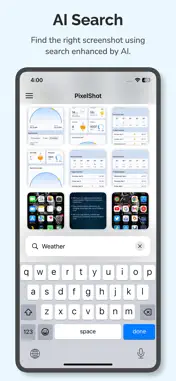
The ultimate tool to organize and manage your screenshots with ease using advanced AI technology. Are you overwhelmed with cluttered screenshots? Do you struggle to find important ones when you need them? PixelShot is here to solve that problem. Our app uses cutting-edge AI to automatically sort and summarize screenshots, making finding and managing the images that matter to you easier than ever. Key Features: AI-Powered Organization Say goodbye to manual sorting! Our intelligent AI automatically categorizes your screenshots based on their content, giving you an organized library. Instant Summaries Let the AI do the work! It analyzes the text within your screenshots and generates concise summaries, helping you quickly recall important information without scrolling through endless images. Privacy First: Local Processing We value your privacy. All screenshots are processed locally on your device, ensuring no image is ever uploaded to the cloud. Your data stays in your hands—secure and private. Text-Only Cloud AI for Summaries When summaries are generated, only the extracted text is sent to the cloud AI for further processing. The text is not stored, and the AI analysis is performed securely. Smart Search & Tagging Easily find screenshots by searching through summaries or using the AI's automatic tags. Stay organized without any extra effort. Clutter-Free Screenshots Organize your screenshots by date, category, or even topic, and experience a new level of convenience. Whether for work, study, or personal use, keeping track of your screenshots has never been easier. Why Choose PixelShot? With PixelShot, managing your screenshot collection becomes hassle-free and intuitive. No more endless scrolling or manually sorting images—just smart, efficient organization. Perfect for busy professionals, students, or anyone looking to declutter their photo library.
What's New
Version 1.1.0 2025-11-04
- Resolved an issue that caused screenshot analysis to fail. - Other bug fixes and performance improvements. Technical Analysis
Package Overview Package analysis available
Bundle ID
aculix.pixelshot.app Current Version 1.1.0
Minimum iOS 18.0
Package Size App Store Size
Package Metadata 1 / 3 version records
FirebaseAnalytics
org.cocoapods.FirebaseAnalytics v11.3.0iOS 100.0+40.12 KB
GoogleAppMeasurement
org.cocoapods.GoogleAppMeasurement v11.3.0iOS 100.0+40.14 KB
GoogleAppMeasurementIdentitySupport
org.cocoapods.GoogleAppMeasurementIdentitySupport v11.3.0iOS 100.0+40.26 KB
Lottie
com.airbnb.Lottie v4.5.0iOS 13.0+2.36 MB
Known Version Records
1 version record with stored package metadata • 3 known version records
Stored metadata does not guarantee a package is currently available to download.
| Details | Version / IDs | Version date | Action |
|---|---|---|---|
 9.75 MB | v1.1.0 App Store ID: 879434726Build: 1 | 2025-11-01 12:49:46 | Get Version |
| Not archived | App Store ID: 869919270 | Unknown | Request Version |
| Not archived | App Store ID: 868951808 | Unknown | Request Version |