
Preview




Description
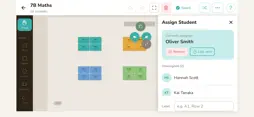
SeatingPlan — Classroom Seating Made Simple Designed exclusively for iPad, SeatingPlan gives teachers a fast, intuitive way to build, manage, and share classroom seating arrangements — no internet connection required, no subscription, no fuss. DRAG & DROP CANVAS Build your classroom from scratch with a full-screen canvas editor. Choose from five desk shapes — rectangle, square, round, rhombus, and trapezoid — and place room objects like whiteboards, bookshelves, teacher's desks, benches, doors, and storage units to accurately reflect your physical space. Desks snap to each other as you drag for perfectly aligned rows and clusters. Rotate any desk or object with on-canvas handles. Copy any item instantly with a single tap. SHARED / GROUP TABLES Add 2, 3, or 4-seat shared tables for group work arrangements. Each seat is individually assigned and clearly labelled, so you can see at a glance exactly who is sitting where — even at a busy cluster table. SMART SORT Let the app do the hard work. Smart Sort automatically places your students across the room while respecting compatibility rules you've set. Students who work well together get placed in the same colour zone; students who clash are kept apart. Locked seats stay put, so you can protect specific placements while sorting the rest. STUDENT MANAGEMENT Build your class list with first and last names, optional notes, and detailed compatibility profiles. Mark students who work well together, flag those who don't, and record individual needs — all visible at a glance in the editor with the colour-coded Needs overlay. COLOUR ZONES Paint desks into group zones using the colour palette. Smart Sort uses these zones to influence placement, making it easy to manage table groups, reading groups, or any other classroom structure you rely on. SEATING HISTORY & VERSIONS Never lose a layout again. SeatingPlan automatically snapshots your seating arrangement every time Smart Sort runs, and you can take a manual snapshot at any time. Browse the full history to see who sat where on any given date. Save named versions — "Term 1 Week 4", "After Excursion", "Reading Groups" — and restore any of them instantly. Your previous layout is always one tap away. ROOM LAYOUTS Save your desk arrangement as a reusable room layout, independent of any class. Switch between a U-shape, rows, or cluster configuration in seconds without rebuilding from scratch. DISPLAY MODE Put your seating plan on the projector or classroom screen. Display Mode shows a clean, full-screen view of the current layout — perfect for students to find their seats at the start of class. AIRPRINT & PDF EXPORT Print your seating plan wirelessly to any AirPrint-compatible printer, or export a PDF to share with a substitute teacher, learning support staff, or save in your records. COMPLETELY OFFLINE Everything is stored locally on your iPad. No account, no cloud, no data ever leaves your device. SeatingPlan works in classrooms with no Wi-Fi and keeps working when your internet doesn't. BUILT FOR IPAD SeatingPlan is designed from the ground up for iPad in landscape mode, with a clean interface optimised for touch. Undo and redo any change. Archive classes you no longer need without deleting them. Duplicate a class to start a new term from an existing setup. Whether you're a primary school teacher rearranging tables every week or a high school teacher managing multiple classes across different rooms, SeatingPlan keeps your classroom organisation fast, flexible, and always at your fingertips.
What's New
Version 2.2 2026-09-27
DARK MODE • Choose Light, Dark or Automatic in Settings — easier on the eyes in a dimmed classroom. • High contrast now also strengthens icons, borders and desk...DARK MODE • Choose Light, Dark or Automatic in Settings — easier on the eyes in a dimmed classroom. • High contrast now also strengthens icons, borders and desk outlines. SMARTER SEATING • Seat preferences: mark students who should sit near the front, the back, the door or your desk, and Smart Sort takes it into account. • Reshuffle reminders: get a gentle nudge to mix up seats every week, fortnight, month or term. • Restore a past seating arrangement from History in one tap. • Relief cards now show each student's seat preference. FASTER SET-UP • New to SeatingPlan? Try the ready-made Sample Class and see Smart Sort in action. • Take student photos with the camera, not just from your library. • Export your class list as a spreadsheet for Excel, Numbers or Google Sheets. ACCESSIBILITY • VoiceOver users can now move, rotate, lock and delete desks. • Text stays readable at the largest sizes without overflowing. • Dates follow your region, and US spelling is used on US devices. Plus refreshed help tours and many smaller improvements. Technical Analysis
Package Overview Basic metadata
Bundle ID
com.seatingplan.app Current Version 2.2
Minimum iOS 15.1
Package Size App Store Size
Package Metadata 1 / 3 version records
Detailed binary, privacy manifest, framework, and Info.plist results have not been indexed for this package yet. The verified App Store and archive metadata above remains available.
Known Version Records
1 version record with stored package metadata • 3 known version records
Stored metadata does not guarantee a package is currently available to download.
| Details | Version / IDs | Version date | Action |
|---|---|---|---|
| 32.42 MB | v2.2 App Store ID: 886863390Build: 2.2 | 2026-09-27 21:09:21 | Paid / Arcade |
| Not archived | App Store ID: 886757348 | Unknown | Paid / Arcade |
| Not archived | App Store ID: 885911263 | Unknown | Paid / Arcade |