Preview




Description
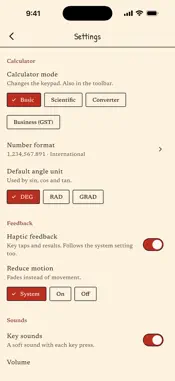
Calsee is a calculator that never looks the same twice. Swipe across the display and a fresh theme appears, generated on your device in one of twelve styles: • Liquid Glass: translucent keys over a slowly drifting colour mesh, with a soft, jelly-like press • Neo-brutalism: flat poster colours, thick outlines and hard offset shadows • Material 3 Expressive: bold tonal colour and keys that change shape as you press • NeoPOP: a dark base, saturated colour and keys that drop into the case • Retro hardware: desk and pocket calculators with seven-segment LCDs or glowing vacuum-fluorescent displays • Neumorphism: soft, sculpted keys pressed out of one surface • Claymorphism: big, puffy pastel keys that squash when you press them • Y2K Aero: glossy gel buttons over a bright sky, or satin chrome and holographic foil • Paper & ink: hand-drawn keys on cream or graph paper, with a rubber-stamp equals key • Cyberpunk: dark plates with neon edges over a glowing grid • Vaporwave: pastel Win95 buttons and a striped sunset sinking into a neon grid • Bauhaus: red, yellow and blue blocks, discs and triangles on cream or black (off to start with: turn it on in Settings › Theme styles) Colour, key shape, type, press motion and sound all come from one seed, so there are millions of combinations, and hand-made hero themes turn up along the way. Every theme is checked for contrast before you see it, so the keys stay easy to read. Swipe back and the last theme returns exactly. The sum you were typing never moves. Underneath the themes it's a careful, accurate calculator: • Exact arithmetic: 0.1 + 0.2 = 0.3, and 1 ÷ 3 × 3 = 1 • Live result preview as you type, with a movable cursor for editing • Scientific mode: sin, cos and tan and their inverses, hyperbolic functions, logs, powers and roots, factorial, memory and DEG/RAD/GRAD, with a 2nd key for the inverse functions. Turn your phone sideways and the scientific keys appear. • Unit converter: length, weight, area, volume, temperature, speed, time, data, fuel economy, energy, power, pressure, force and angle, plus Indian units such as tola, gaj, guntha and bigha (by state). Every conversion factor is exact. • Brackets and percent that work the way you expect • Hold any key to learn what it does, with a worked example you can watch • The amount in words under every result: "≈ 12.35 crore" at a glance, or every word with a tap. Lakh and crore or million and billion, in English or Hindi. • Number formats, including Indian lakh and crore grouping • History kept on your device for as long as you choose. Search it, add notes, pin favourites, export it as a spreadsheet (CSV), tap an entry to reuse it, or turn it off. • Business mode for shops and invoices: GST keys (5, 18 and 40%, or your own rates) with the CGST and SGST split, a running grand total, a 00 key, rounding to paise, and amounts in cheque wording: "Rupees … and … Paise Only" • 11 keystroke sound packs, from mechanical switches to a retro beep, matched to each theme or fixed to your favourite • Haptics tuned to each theme style, or switched off • Hardware keyboard support, with shortcuts to change the theme Make it yours: • Lock theme: found one you love? Swipes leave it alone. • Theme styles: choose which styles new themes come from. • Accessible themes: 7:1 contrast for maximum legibility. • Left-handed layout: = and the operators on the left, within reach of your thumb. • Reduce motion and one-handed mode. Liquid Glass switches to solid keys when your device asks for less transparency. Private by design: no ads, no accounts, no tracking, and nothing you type leaves your device. Calsee works completely offline. Theme sharing is coming in a future update.
What's New
Version 1.4.3 2026-11-14
• The currency converter has been removed. Exchange rates change every day, and Calsee works fully offline, so it could only ever show old rates. The unit conve...• The currency converter has been removed. Exchange rates change every day, and Calsee works fully offline, so it could only ever show old rates. The unit converter stays, with all 14 categories and Indian units such as tola, gaj and bigha. • After you have explored a few themes, the App Store may ask once whether you would like to rate Calsee. You can always say not now. Technical Analysis
Package Overview Basic metadata
Bundle ID
tech.calsee.app Current Version 1.4.3
Minimum iOS 15.0
Package Size App Store Size
Package Metadata 0 / 0 version records
Detailed binary, privacy manifest, framework, and Info.plist results have not been indexed for this package yet. The verified App Store and archive metadata above remains available.
Developer Information
Known Version Records
0 version records with stored package metadata
Stored metadata does not guarantee a package is currently available to download.
| Details | Version / IDs | Version date | Action |
|---|