
Preview


Description
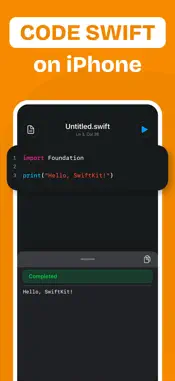
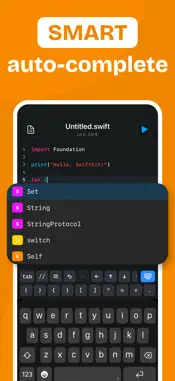
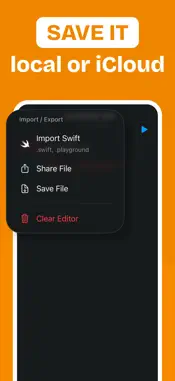
Write, run, and refine Swift code from your iPhone or iPad. SCode gives you a lightweight Swift coding workspace built for quick practice, testing, learning, and experimentation. Write code in a focused editor, run real Swift, review output, and fix errors without needing a full desktop setup. • Code Anywhere Write Swift in a clean mobile editor with syntax highlighting and autocomplete support. • Run Real Swift Compile and test Swift code directly from your device, so you can try ideas quickly wherever you are. • Choose Your Compiler Switch between supported Swift compiler versions and test how your code behaves across different Swift environments. • Clear Output & Diagnostics Review console output, compile errors, runtime errors, warnings, and diagnostics in a readable format. • Import & Export Swift Files Open .swift files, edit your code, and save or share polished files when you are done. • Custom Editor Settings Adjust themes, font size, tabs, line wrapping, and editor behavior to match the way you like to code. • Built for Practice and Learning SCode is ideal for developers, students, interview practice, tutorials, quick experiments, and anyone learning Swift. How SCode Works 1. Write your Swift code in the editor. 2. Choose your compiler version. 3. Run your code and review the result. SCode helps you stay close to your ideas. Whether you are testing a small function, learning a new Swift concept, or practicing code on the go, you can write and run Swift with a simple, focused workspace. Download SCode and start coding in Swift from anywhere. DISCLAIMER: SCode is an independent app and is not affiliated with, endorsed by, or associated with Apple Inc. Privacy Policy: https://925apps.com/privacy Terms of Use: https://925apps.com/terms
Technical Analysis
Package Overview Basic metadata
Bundle ID
com.925app.swiftkit Current Version 1.0
Minimum iOS 17.0
Package Size App Store Size
Package Metadata 1 / 1 version records
Detailed binary, privacy-manifest, framework, and Info.plist results have not been indexed for this package yet. The verified App Store and archive metadata above remains available.
Price History (USA store)
2 recorded price change points. These are historical observations, not a guarantee of the current price.
| Recorded at | Price | Currency |
|---|---|---|
| 4.99 | USD | |
| 0.0 | USD |
Developer Information
Known Version Records
1 version record with stored package metadata
Stored metadata does not guarantee a package is currently available to download.
| Details | Version / IDs | Version date | Action |
|---|---|---|---|
| 18.52 MB | v1.0 App Store ID: 886800299Build: 1.0 | 2026-06-30 22:22:29 | Get Version |