
Preview




Description
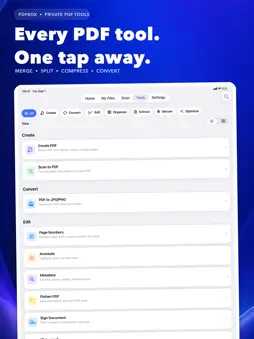
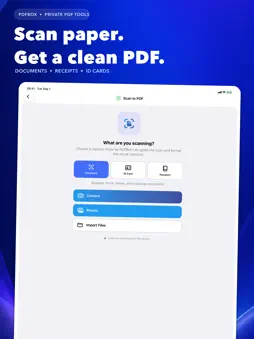
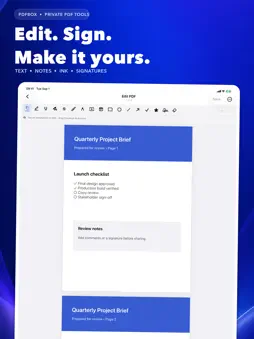
Meet PDFBox, a private all-in-one workspace for scanning, creating, editing, organizing, and sharing PDF documents. SCAN AND CREATE • Capture documents, receipts, ID cards, and passports as clean PDFs • Create PDFs from photos, scans, blank pages, or typed text • Choose page size, orientation, image fit, and output quality EDIT AND SIGN • Add text, highlights, notes, shapes, and freehand ink • Create and place handwritten signatures • Add watermarks and page numbers • Flatten annotations into finished pages ORGANIZE DOCUMENTS • Merge multiple PDFs into one ordered document • Split files by page or custom ranges • Reorder, rotate, remove, and extract pages • Edit title, author, subject, and keyword metadata CONVERT AND EXTRACT • Turn PDF pages into JPG or PNG images • Extract text and embedded images • Use on-device OCR to recognize text in scanned pages OPTIMIZE AND SECURE • Compress files for easier sharing • Protect PDFs with a password or create an unlocked copy • Convert pages to grayscale • Repair damaged or unreadable files PRIVATE BY DESIGN Core document processing happens on your device. PDFBox works offline, requires no account, and does not send your documents to our servers. Whether you need to scan a receipt, sign a form, combine a report, shrink an attachment, or extract text from a paper document, PDFBox keeps the tools you need in one focused workspace.
What's New
Version 1.2 2026-10-22
FIXED BUGS AND IMPROVED PERFORMANCES Technical Analysis
Package Overview Basic metadata
Bundle ID
com.softutopia.PDFBox Current Version 1.2
Minimum iOS 16.6
Package Size App Store Size
Package Metadata 0 / 0 version records
Detailed binary, privacy manifest, framework, and Info.plist results have not been indexed for this package yet. The verified App Store and archive metadata above remains available.
Developer Information
Known Version Records
0 version records with stored package metadata
Stored metadata does not guarantee a package is currently available to download.
| Details | Version / IDs | Version date | Action |
|---|