
Preview


Description
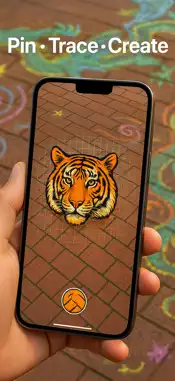
Turn your iPhone or iPad into a powerful AR tracing projector. Project any image onto a wall, canvas, or sidewalk — no grid lines, no bulky projector, just your screen and your imagination. One-time purchase — no ads, no subscriptions. How it works 1. Tag – Choose any photo and tap your surface. QuickDraw AR locks it in 3-D space using advanced ARKit and LiDAR precision on iPhone Pro and iPad Pro. 2. Tweak – Pinch, rotate, and move to size your reference exactly where you want it. Adjust opacity so your lines stay visible without blocking your view. 3. Trace – Draw naturally while your image stays perfectly anchored — even when you move or step back. Key features * LiDAR-powered precision for rock-solid image anchoring on iPhone Pro & iPad Pro * Works anywhere — walls, sidewalks, canvases, whiteboards, classroom posters * Instantly scale designs—from small sketches to giant murals * Use any photo on your device * Universal purchase — works on both iPhone and iPad * 100% Ad-free. Zero subscriptions. Buy once, create forever. Who’s it for * Parents and kids tracing chalk art or coloring pages * Teachers projecting diagrams or maps in class * Chalk and street artists scaling up sketches outdoors * Muralists and sign painters planning complex layouts * Anyone who loves to draw — faster and easier Why Quick Draw AR? Go from idea to outline in minutes, not hours. QuickDraw AR keeps your reference image steady so you can focus on what matters—the fun of creating. One-time purchase. No subscriptions. No ads. Just pure, fast tracing magic.
What's New
Version 1.0.7 2026-09-13
• Enhanced AR anchoring stability for iPhone Pro & iPad Pro models. • Smoother opacity and scaling controls for precise tracing visibility. • Performance improv... Technical Analysis
Package Overview Basic metadata
Bundle ID
com.inburst.quickdrawar Current Version 1.0.7
Minimum iOS 18.0
Package Size App Store Size
Package Metadata 1 / 6 version records
Detailed binary, privacy manifest, framework, and Info.plist results have not been indexed for this package yet. The verified App Store and archive metadata above remains available.
Known Version Records
1 version record with stored package metadata • 6 known version records
Stored metadata does not guarantee a package is currently available to download.
| Details | Version / IDs | Version date | Action |
|---|---|---|---|
| 2.19 MB | v1.0.7 App Store ID: 885254455Build: 1.0.7 | 2026-09-13 02:44:33 | Paid / Arcade |
| Not archived | App Store ID: 883862384 | Unknown | Paid / Arcade |
| Not archived | App Store ID: 881170292 | Unknown | Paid / Arcade |
| Not archived | App Store ID: 879425402 | Unknown | Paid / Arcade |
| Not archived | App Store ID: 875799544 | Unknown | Paid / Arcade |
| Not archived | App Store ID: 875670686 | Unknown | Paid / Arcade |