
Preview




Description
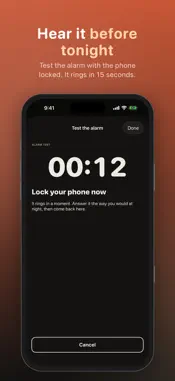
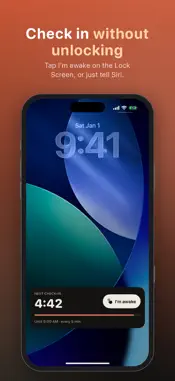
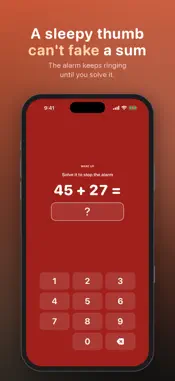
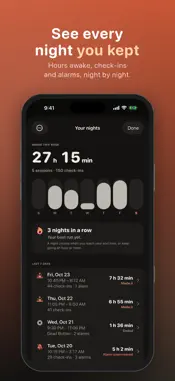
Stay awake until the time you choose. Keep Me Awake rings the moment you start to drift off, so you make it through the night feed, the night shift, the all-nighter or the jet-lag reset. TWO WAYS TO STAY AWAKE • Check-In: tap "I'm awake" every 5, 10 or 15 minutes. Miss one and the alarm goes off. • Dead Button: hold a finger on the screen. The moment it slips, the alarm rings. • Set "stay awake until" (say 6 AM) and press Start: the session ends on time, even the night the clocks change. RINGS WHEN IT MATTERS • Hear it before tonight: Test the alarm (Settings) rings 15 s after you lock the phone, like a missed check-in. Not heard? It says what to change: Silent, volume, Alarms or a Focus. • On iOS 26, a missed check-in rings like the Clock app: through Silent and Focus, phone locked or app closed. • Before iOS 26, a chain of Time Sensitive notifications rings through a Focus like Sleep (Silent mode can mute it). • Unanswered, it rings up to 15 minutes, then stops; the start screen says when. • If iOS closes the app overnight, your session keeps going. • A call, Siri or unplugged headphones can't silence the in-app alarm for good. It warns if the volume is low or headphones are in. • Notifications off and no Alarms? The start screen says nothing can ring with the app closed. • A phone that dies can't ring: the app warns when the battery is low and unplugged or won't last to your end time. Can't plug in? With Alarms on, a Check-In lets the screen sleep and still rings. CHECK IN WITHOUT UNLOCKING • The countdown sits on the Lock Screen (all night, past iOS's 8 hours) and in the Dynamic Island, with an "I'm awake" button. • Hands full? Say "Hey Siri, I'm awake in Keep Me Awake" (or press the Action button): the check-in starts over, phone locked, and Siri says when the next is due. • Alarm ringing with the app closed? Touch and hold its notification (or use your Apple Watch) and tap I'm awake. With the wake-up check on, only the sum stops it. WIDGETS AND ONE-TAP START (FREE) • The Tonight widget for your Home Screen (small or wide), StandBy and the Lock Screen (a card, a countdown ring or a line above the clock). • It shows your end time, this week's hours and nights in a row; during a Check-In, a countdown and "I'm awake" (Home Screen, StandBy). • On iOS 18+, put Start Check-In in Control Center, on the Lock Screen or the Action button, or ask Siri to start one. NODDED OFF? SHAKE IT OFF • After a check-in alarm, the screen suggests one quick way to wake up: stand up, cold water on your face, a brighter light. • Optional wake-up check, in both modes: a sleepy thumb can't fake a sum, so the alarm rings until you solve one. SEE EVERY NIGHT YOU KEPT • Hours awake this week, a bar per day, and nights in a row kept to your end time. • Tap a night: each check-in, when the alarm rang, how fast you answered. • Your nights stay on your phone. Delete one or all. EASY TO READ AT 3 AM • Every screen, button, sum key and the Lock Screen card's words grow with your text size, up to the largest. • VoiceOver reads the countdown and every button, says when the alarm rings and how to stop it, and lets you hold Dead Button's circle. Dark Mode and Reduce Motion supported. PRO, A ONE-TIME PURCHASE (NO SUBSCRIPTION) • When you slow down: the hours the alarm had to ring most in your last 30 nights, and an option for check-ins about twice as often in those hours • Start soft, get louder: the check-in alarm builds to full volume over 30 seconds • All four alarm sounds, plus your own sound files (they ring with the app closed) • Check-ins every 1, 2 or 3 minutes, or Random (3 to 8 minutes apart, no rhythm to doze off to) • Unlimited Dead Button (free sessions last 15 minutes) • Three harder sums for the wake-up check • All your nights, all-time totals and a CSV export (the last 7 days are free) • Volume control and intense vibration Please don't use Keep Me Awake to keep driving. If you're too tired to drive, pull over and rest.
What's New
Version 1.0.9 2026-11-01
New with Pro: When you slow down. Your nights now show the hours your check-ins start to slip, so you know when to get up, stretch or make the coffee, and check... Technical Analysis
Package Overview Basic metadata
Bundle ID
com.aaon.keepmeawake Current Version 1.0.9
Minimum iOS 17.0
Package Size App Store Size
Package Metadata 0 / 4 version records
Detailed binary, privacy manifest, framework, and Info.plist results have not been indexed for this package yet. The verified App Store and archive metadata above remains available.
Developer Information
Known Version Records
0 version records with stored package metadata • 4 known version records
Stored metadata does not guarantee a package is currently available to download.
| Details | Version / IDs | Version date | Action |
|---|---|---|---|
| Not archived | App Store ID: 886031745 | Unknown | Request Version |
| Not archived | App Store ID: 885980571 | Unknown | Request Version |
| Not archived | App Store ID: 885693319 | Unknown | Request Version |
| Not archived | App Store ID: 885045786 | Unknown | Request Version |