Preview





Description
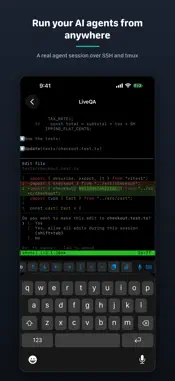
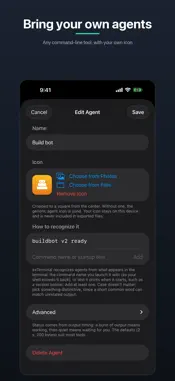
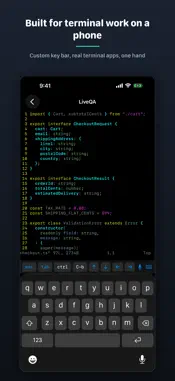
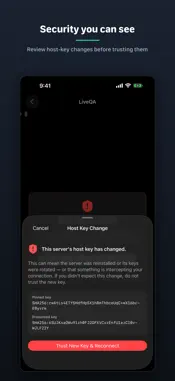
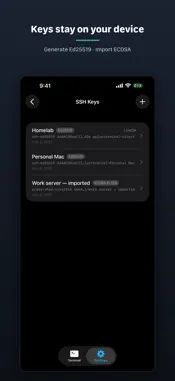
a+Terminal is a privacy-first SSH terminal for working on your own machines from your iPhone — built around tmux and CLI AI coding agents. It's agent-agnostic: run any CLI coding agent, with plug-and-play profiles you can extend yourself. SCROLLING THAT ACTUALLY WORKS Swipes become real mouse-wheel events, so tmux and your agent's output scroll natively, with momentum — no more fighting copy-mode. SPEAK YOUR PROMPTS Push-to-talk dictation inserts straight into the terminal. Recognition runs entirely on your iPhone; audio never leaves the device. NEVER LOSE YOUR SESSION Live Activities and the Dynamic Island show your active sessions at a glance. Tap to jump back in — a+Terminal reconnects and re-attaches your session multiplexer (tmux, zellij, and more) automatically. PREVIEW YOUR DEV SERVER Start a dev server on the machine you're connected to and a+Terminal spots the port — from the URL your framework prints, or from the machine's own listener table. Tap it and the page opens over the SSH connection you already have. It renders in a viewer built for exactly one thing: the single port you forwarded. Every other address is refused, nothing it loads is kept, and it is not a web browser. Reload with a tap, and switch between the mobile and desktop layout to check both. MONITOR YOUR MAC Add a Monitor (VNC) session to watch your own computer's screen sharing right from your phone. Sign in with your macOS account and you land straight on the desktop; pinch to zoom and pan. Pop the screen out into a floating Picture-in-Picture window to keep an eye on it while you use other apps. Turn on Control to tap, drag, and type — enough to unlock a locked Mac and take over. It stays view-only until you do, and it connects only to the machine you enter. (Beta.) ZERO DATA COLLECTION No analytics, no accounts, no crash SDKs, no servers of ours. The App Privacy label says "Data Not Collected" because there is nothing to collect it with. The only network traffic is your own connections to machines you configure. SUPPORT THE APP An optional tip jar lets you support a+Terminal's development. Tips are one-time and unlock nothing — every feature is always available. • ed25519 keys generated on-device and kept in this device's Keychain, never in backups; they leave it only if you reveal, copy or export them • Password authentication option, stored in the Keychain only • Trust-on-first-use host key pinning with hard mismatch failures • Sticky Ctrl and C-b (tmux prefix) keys, Esc/Tab/arrows accessory bar • Attach an image or file from your phone over the existing SSH connection • Plug-and-play agent & multiplexer profiles — any CLI agent, tmux, zellij, screen — or define your own, no update required • Multiple simultaneous sessions with server groups • Preview a dev server running on the far end, over the SSH connection you already have — port detection and a single-port viewer • Monitor (VNC): view-only screen sharing for your own Mac, with a floating Picture-in-Picture window and optional touch & keyboard control (beta) • Light, dark, and follow-system themes Privacy Policy: https://aaroncx.github.io/a-plus-terminal/privacy
What's New
Version 1.0.4 2026-10-26
New: bring your own agents, and see which ones are waiting at a glance. • Custom agents: Settings → Agents lets you add any command-line tool as an agent, with... Technical Analysis
Package Overview Basic metadata
Bundle ID
com.aaroncx.aplusterminal Current Version 1.0.4
Minimum iOS 26.0
Package Size App Store Size
Package Metadata 0 / 4 version records
Detailed binary, privacy manifest, framework, and Info.plist results have not been indexed for this package yet. The verified App Store and archive metadata above remains available.
Developer Information
Known Version Records
0 version records with stored package metadata • 4 known version records
Stored metadata does not guarantee a package is currently available to download.
| Details | Version / IDs | Version date | Action |
|---|---|---|---|
| Not archived | App Store ID: 888838079 | Unknown | Request Version |
| Not archived | App Store ID: 888194474 | Unknown | Request Version |
| Not archived | App Store ID: 887807433 | Unknown | Request Version |
| Not archived | App Store ID: 886853723 | Unknown | Request Version |