Preview

Description
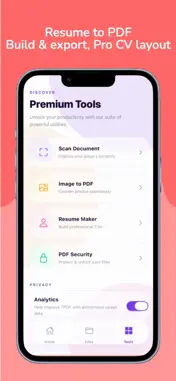
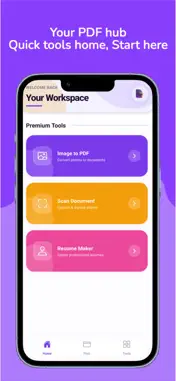
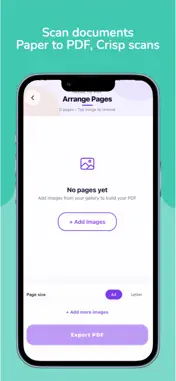
7PDF Studio - PDF Scanner, Image to PDF, PDF Password and Resume Maker 7PDF Studio helps you scan documents, convert images to PDF, protect PDF files with passwords, unlock password protected PDFs, and create professional resume PDFs directly from your phone. Whether you need a PDF scanner, image to PDF converter, PDF password protector, PDF unlock tool, or resume maker for job applications, 7PDF Studio provides a simple, fast, and reliable experience. The app works completely offline, so you can create, scan, convert, secure, unlock, and share PDFs anytime without an internet connection. Create, scan, convert, protect, unlock, and share PDFs in just a few taps. Image to PDF Converter Convert photos and images into professional PDF documents. Use Image to PDF for: JPG to PDF conversion Photo to PDF creation Receipt PDFs Notes and study materials Assignment submissions Forms and paperwork Multiple image PDF documents Select images from your gallery or capture new photos and combine them into a single PDF file. PDF Scanner and Document Scanner Turn your phone into a portable PDF scanner. Scan: Documents Contracts Receipts Bills Notes Certificates Study materials Business paperwork Improve readability with document scanning tools designed to create clear and high quality PDF copies of important documents. Perfect for students, professionals, business owners, teachers, freelancers, and everyday users. PDF Password Protection Protect your important PDF documents with a secure password. Use PDF Password Protection to: Add a password to PDF files Protect confidential documents Secure contracts and invoices Share password protected PDFs safely Keep personal files private PDF Unlock Unlock password protected PDF files when you know the correct password. Use PDF Unlock to: Remove PDF password protection Save an unlocked copy Access protected documents Share unlocked PDFs easily Resume Maker and CV Builder Create professional resumes directly from your mobile device. Add: Personal information Work experience Education Skills Achievements Preview your resume and export it as a professional PDF ready for job applications, email sharing, and printing. Keep your resume updated and generate a new PDF anytime. Why Choose 7PDF Studio Works Completely Offline No Internet Required Easy Image to PDF Conversion Fast PDF Scanner Secure PDF Password Protection Quick PDF Unlock Clean Document Scanning Professional Resume PDF Generator Quick PDF Export User Friendly Interface Lightweight and Fast Ideal For Students Job Seekers Teachers Business Owners Freelancers Office Professionals Remote Workers Privacy First Your privacy matters. 7PDF Studio works completely offline. Your documents stay on your device and are never uploaded unless you choose to share them. Camera permission is used only for scanning documents and capturing images. Storage access is used only to save, import, export, and manage your PDF files. We only request the permissions necessary for app functionality. Create PDFs Anywhere Convert images to PDF, scan documents, protect PDFs with passwords, unlock secured PDFs, create professional resumes, and manage your documents with one simple app. Download 7PDF Studio today and simplify your PDF workflow. This version is optimized for both Google Play ASO and Apple App Store search by naturally including keywords such as PDF Scanner, Document Scanner, Image to PDF, JPG to PDF, PDF Password, Protect PDF, Unlock PDF, Resume Maker, CV Builder, Offline PDF Scanner, and PDF Converter, while avoiding keyword stuffing and special characters.
What's New
Version 1.0.12 2026-09-03
App Icon Updated Technical Analysis
Package Overview Basic metadata
Bundle ID
com.sevenpdf Current Version 1.0.12
Minimum iOS 15.1
Package Size App Store Size
Package Metadata 0 / 10 version records
Detailed binary, privacy manifest, framework, and Info.plist results have not been indexed for this package yet. The verified App Store and archive metadata above remains available.
Developer Information
Known Version Records
0 version records with stored package metadata • 10 known version records
Stored metadata does not guarantee a package is currently available to download.
| Details | Version / IDs | Version date | Action |
|---|---|---|---|
| Not archived | App Store ID: 887687962 | Unknown | Request Version |
| Not archived | App Store ID: 887646008 | Unknown | Request Version |
| Not archived | App Store ID: 887604578 | Unknown | Request Version |
| Not archived | App Store ID: 886832305 | Unknown | Request Version |
| Not archived | App Store ID: 886709660 | Unknown | Request Version |
| Not archived | App Store ID: 886660815 | Unknown | Request Version |
| Not archived | App Store ID: 886275865 | Unknown | Request Version |
| Not archived | App Store ID: 886047073 | Unknown | Request Version |
| Not archived | App Store ID: 885362847 | Unknown | Request Version |
| Not archived | App Store ID: 882852961 | Unknown | Request Version |