Preview



Description
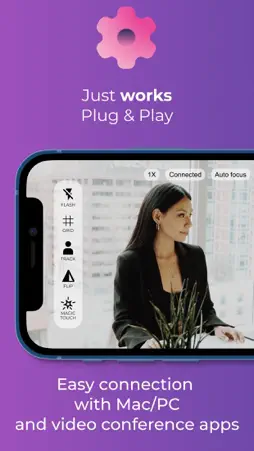
The world is evolving and everyone is going virtual. Businesses, meetings, work calls, live video sessions. You can’t attend an event physically? Hop on a computer video call. Do you need a quick meeting with your team? Schedule a computer online call. You can’t fly out because of a delayed flight? Use video conference. Do you need to work with an expert who is in a distant location? Set up a google meet. Virtual meet-ups save money, time, and stress. It’s also essential that we look good on these calls. It’s not just about making up and dressing up. How good is your lighting? How are you positioned? You want to look bright and good for an interview or an important live conference. It’s okay to rely on your amazing iPhone camera. Not to burst your bubbles but it’s not enough. It gets better because you can achieve this without having to buy a ring light. This is where GetCam comes in. It’s the best web camera for high-quality online calls and live streams. GetCam does more than just lighting. It helps with proper angles for an effective video session. The fantastic thing about GetCam is how well it works with streaming and online conference apps. It basically, gives your virtual life a different experience, in a positive way of course. You don’t have to go through a hassle to achieve all these. All you need to do is download GetCam and connect. As much as it handles everything for you, it gives you a form of control over the features. You can choose what you want to focus your camera on and zoom in. Create any scenery or frame you want for your video. There’s also an inbuilt flashlight that just makes the video calls better. Everything about GetCam makes video calls perfect. GetCam allows You to: - Enjoy the lag-free, beautiful and stable video for Your live videos - Connect Mac and Windows machines, hassle-free - Effortlessly connect with videoconferencing and streaming apps - Create any frame and scene with access to all iPhone cameras - Magic Touch automatically shows you the best exposure and colors - Fill the scene using the built-in flashlight - Manually focus and zoom - Position Yourself in the video grid - Track Your head across the screen - Mirror/flip the video from any iPhone camera GetCam (Spotlight) iOS and Mac/Windows apps run together. Remember to install both - download Mac and PC apps from www.getcam.co Terms of Use: www.getcam.co/TnC.pdf
What's New
Version 2.5.0 2022-11-14
Hi-quality, no lag iPhone as a webcam for PC and Mac! Technical Analysis
Package Overview Basic metadata
Bundle ID
es.4spac.SpotlightCamera Current Version 2.5.0
Minimum iOS 10
Package Size App Store Size
Package Metadata 1 / 20 version records
Detailed binary, privacy manifest, framework, and Info.plist results have not been indexed for this package yet. The verified App Store and archive metadata above remains available.
Known Version Records
1 version record with stored package metadata • 20 known version records
Stored metadata does not guarantee a package is currently available to download.
| Details | Version / IDs | Version date | Action |
|---|---|---|---|
| 39.82 MB | v2.5.0 App Store ID: 853327350Build: 2.5.0 | 2022-11-14 16:36:52 | Get Version |
| Not archived | App Store ID: 851867185 | Unknown | Request Version |
| Not archived | App Store ID: 851309403 | Unknown | Request Version |
| Not archived | App Store ID: 851135253 | Unknown | Request Version |
| Not archived | App Store ID: 850605675 | Unknown | Request Version |
| Not archived | App Store ID: 847852218 | Unknown | Request Version |
| Not archived | App Store ID: 847641102 | Unknown | Request Version |
| Not archived | App Store ID: 847120527 | Unknown | Request Version |
| Not archived | App Store ID: 847019345 | Unknown | Request Version |
| Not archived | App Store ID: 846361940 | Unknown | Request Version |
| Not archived | App Store ID: 845523830 | Unknown | Request Version |
| Not archived | App Store ID: 844987218 | Unknown | Request Version |
| Not archived | App Store ID: 844940832 | Unknown | Request Version |
| Not archived | App Store ID: 844850560 | Unknown | Request Version |
| Not archived | App Store ID: 842374563 | Unknown | Request Version |
| Not archived | App Store ID: 842071575 | Unknown | Request Version |
| Not archived | App Store ID: 842034226 | Unknown | Request Version |
| Not archived | App Store ID: 840473753 | Unknown | Request Version |
| Not archived | App Store ID: 840029156 | Unknown | Request Version |
| Not archived | App Store ID: 836859420 | Unknown | Request Version |