
Preview




Description
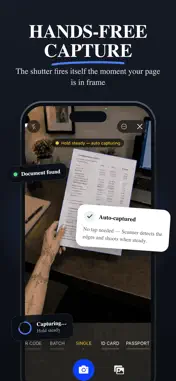
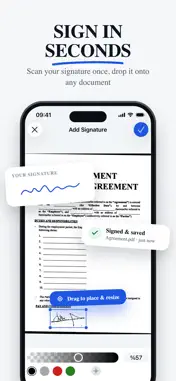
Scan any document and let AI do the rest. Scanner turns your phone into a powerful document scanner, PDF creator, file converter, and AI document assistant. Capture paperwork in seconds, summarize long reports, extract key information, and ask questions about anything you scan. SCAN ANYTHING IN SECONDS Point your camera at a page and Scanner automatically detects the edges, captures it when steady, corrects the perspective, improves the lighting, and creates a clean digital copy. • Hands-free auto-capture • Automatic edge detection and smart cropping • Perspective and lighting correction • Batch scanning for up to 50 pages • Scan receipts, invoices, notes, contracts, photos, ID cards, and passports • Scan both sides of an ID card • Built-in QR code scanner AI THAT READS FOR YOU Save time on long or complicated documents with built-in AI tools. • Summarize documents in seconds • Extract names, dates, amounts, numbers, and action items • Ask questions about scanned documents • Find specific details without reading every page • Translate scanned documents into your language AI features are optional. When you choose to use them, relevant document text or page images may be securely processed by third-party AI providers after you grant permission. AI-generated results may be inaccurate, so verify important information. CONVERT TO EDITABLE FILES Turn paper documents into files you can continue editing on your phone or computer. • Convert scans into editable text documents • Extract tables into spreadsheets • Turn documents into presentations • Export as PDF, image, editable document, spreadsheet, or presentation files • Combine multiple pages or images into one PDF • Share files through email, messaging apps, or cloud storage EDIT, SIGN, AND SHARE Prepare documents without needing a computer. • Crop, rotate, reorder, and enhance pages • Add your signature to PDF documents • Create and reuse a digital signature • Scan and save invoices as PDF files • Organize multiple pages into one document STAY ORGANIZED Keep important documents easy to find. • Smart folders for receipts, ID cards, invoices, and more • Full-text search across scanned documents • Search inside PDFs using recognized text • Filter by scans, documents, spreadsheets, or presentations • Rename and organize files in one place • Optional account and cloud sync across devices PRIVACY BY DESIGN Your scans stay on your device by default. Document capture and basic text recognition are processed locally. You can scan, save, and export without creating an account. Documents are uploaded only when you enable cloud sync or actively use a feature that requires online processing, such as AI or file conversion. AI features require permission before document content is sent for processing. Scanner does not sell your personal information or display third-party ads. HOW TO SCAN A DOCUMENT 1. Open Scanner and create a new document. 2. Point your camera at the page. 3. Scanner automatically detects and captures it. 4. Crop, enhance, reorder, or add more pages. 5. Save as PDF or convert it into another format. SCANNER PREMIUM Some features, including AI tools, file conversion, advanced PDF editing, and QR code tools, may require a Scanner Premium subscription. Available plans, prices, billing periods, and included features are shown before purchase. Payment is charged to your store account after confirmation. Subscriptions renew automatically unless canceled before the end of the current billing period. You can manage or cancel your subscription through your account settings. Privacy Policy: https://www.scannedapp.com/privacy Terms of Use: https://www.scannedapp.com/terms
What's New
Version 6.8 2026-08-26
Minor bug fixes & improvements Technical Analysis
Package Overview Basic metadata
Bundle ID
com.42dijital.scanned Current Version 6.8
Minimum iOS 16.6
Package Size App Store Size
Package Metadata 1 / 56 version records
4.5 / 5.0 (210 ratings)
Detailed binary, privacy manifest, framework, and Info.plist results have not been indexed for this package yet. The verified App Store and archive metadata above remains available.
Price History (USA store)
2 recorded price change points. These are historical observations, not a guarantee of the current price.
| Recorded at | Price | Currency |
|---|---|---|
| 0.99 | USD | |
| 0.0 | USD |
Developer Information
Known Version Records
1 version record with stored package metadata • 56 known version records
Stored metadata does not guarantee a package is currently available to download.
| Details | Version / IDs | Version date | Action |
|---|---|---|---|
| 87.32 MB | v6.8 App Store ID: 886850482Build: 6.8 | 2026-08-26 08:56:18 | Get Version |
| Not archived | App Store ID: 886622995 | Unknown | Request Version |
| Not archived | App Store ID: 854773898 | Unknown | Request Version |
| Not archived | App Store ID: 854446131 | Unknown | Request Version |
| Not archived | App Store ID: 854081542 | Unknown | Request Version |
| Not archived | App Store ID: 854023708 | Unknown | Request Version |
| Not archived | App Store ID: 853489866 | Unknown | Request Version |
| Not archived | App Store ID: 852639454 | Unknown | Request Version |
| Not archived | App Store ID: 852514368 | Unknown | Request Version |
| Not archived | App Store ID: 850682692 | Unknown | Request Version |
| Not archived | App Store ID: 850557067 | Unknown | Request Version |
| Not archived | App Store ID: 850229915 | Unknown | Request Version |
| Not archived | App Store ID: 850006692 | Unknown | Request Version |
| Not archived | App Store ID: 849610488 | Unknown | Request Version |
| Not archived | App Store ID: 849527895 | Unknown | Request Version |
| Not archived | App Store ID: 849052958 | Unknown | Request Version |
| Not archived | App Store ID: 848966641 | Unknown | Request Version |
| Not archived | App Store ID: 848913074 | Unknown | Request Version |
| Not archived | App Store ID: 848840862 | Unknown | Request Version |
| Not archived | App Store ID: 848698584 | Unknown | Request Version |
| Not archived | App Store ID: 848509578 | Unknown | Request Version |
| Not archived | App Store ID: 848365776 | Unknown | Request Version |
| Not archived | App Store ID: 848213875 | Unknown | Request Version |
| Not archived | App Store ID: 848070716 | Unknown | Request Version |
| Not archived | App Store ID: 847915441 | Unknown | Request Version |
| Not archived | App Store ID: 847750300 | Unknown | Request Version |
| Not archived | App Store ID: 847659136 | Unknown | Request Version |
| Not archived | App Store ID: 847421267 | Unknown | Request Version |
| Not archived | App Store ID: 847348928 | Unknown | Request Version |
| Not archived | App Store ID: 847305351 | Unknown | Request Version |
| Not archived | App Store ID: 847262179 | Unknown | Request Version |
| Not archived | App Store ID: 847129514 | Unknown | Request Version |
| Not archived | App Store ID: 847047896 | Unknown | Request Version |
| Not archived | App Store ID: 846908575 | Unknown | Request Version |
| Not archived | App Store ID: 846884167 | Unknown | Request Version |
| Not archived | App Store ID: 846843767 | Unknown | Request Version |
| Not archived | App Store ID: 846602038 | Unknown | Request Version |
| Not archived | App Store ID: 846244825 | Unknown | Request Version |
| Not archived | App Store ID: 846192153 | Unknown | Request Version |
| Not archived | App Store ID: 846003678 | Unknown | Request Version |