Preview




Description
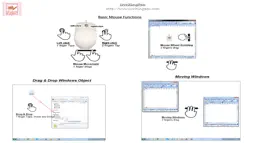
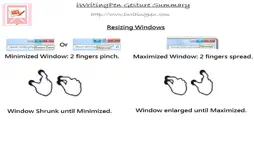
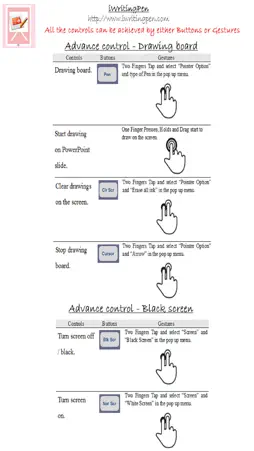
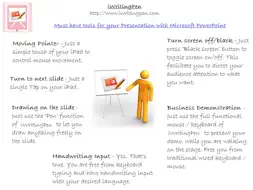
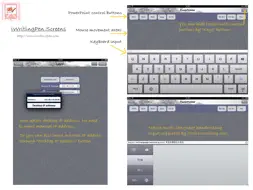
iWritingPen helps you manage Microsoft PowerPoint presentation. With iWritingPen, you are guaranteed a smooth and efficient presentation. Functions and features: - Full set of control buttons for progressing PointPoint slides. Just through a simple touch on the control buttons, you can advance or go backward of your slides. You would then rather focus on managing the audience attention instead of worrying how to advance the slides while presenting remotely. - Drawing board on top of PowerPoint slide. With ‘Pen’ function of iWritingPen, you can write anything on the screen on top of any PowerPoint slides to elaborate the points being discussed. You no longer need the other clumsy physical drawing board nearby for drawing something during presentation. Your audiences will stay on the same screen during the whole presentation and their attentions will not be diverted. - ‘Black Screen’ function. Whenever there is a need to have a longer period for discussion with audience in the middle of presentation, the “Black” screen function turns the screen off (black color) and let you control the audience focus of the subject matters. - Full functional Keyboard Mouse You no longer need to rush to come in front of desktop to control your moues and keyboard for typing. You will have full remote controls your desktops, while presenting, through the Keyboard Mouse of iWritingPen. - Handwriting input and Voice Spoken sentence input To empower you to have quick typing during presentation, iWritingPen supports the native handwriting input of all languages available in iPad / iPhone including voice sentence recognition input. iWritingPen (free version) comes with basic control buttons of PowerPoint and multi-touches gesture controlled mouse function. This is more than enough for a normal presentation controls. In-app purchase offer advance users with Drawing Board Pen and Black Screen buttons and remote Keyboard function. iWritingPen is WITHOUT advertisements. What are you waiting for? Download and install it now immediately. Please Write us a GOOD review in App Store for such HIGH Quality App as rewards to us. We need your support and appreciation! Prerequisites: iWritingPen Desktop client program - it requires to install iWritingPen client desktop program on your desktop. It could be downloaded from the link below. http://www.iwritingpen.com/index.php/download - Supported Desktop Operation System: Windows 10, Windows 8, Windows 7 and Vista. Apple Mac OS X 10.6 or later. - Microsoft PowerPoint 2003 or later. - iPhone / iPad must be on the same network with windows desktop. The smooth data communication between desktops and iPhone /iPad is required for iWritingPen to work efficiently. For those users with desktop Mac OS X 10.6 or later, it is highly recommended to use the bluetooth to connect to iPhone/iPad. The data traffic congestion in the local router can be avoided under bluetooth connection. Please refer to the link below for setup and configuration: http://www.iwritingpen.com/index.php/download/ Detail product Information & support: For the future update on the iWritingPen, please register as a member through the link: http://www.iwritingpen.com/index.php/register or join us at Facebook https://www.facebook.com/pages/Iwritingpen/652275478128116 For the detail iWritingPen information, please visit our website http://www.iwritingpen.com
What's New
Version 1.0.3 2017-11-13
- Remove advertisements. iWritingPen has become an app without advertisement. - Solved the bug that caused app crashes when 'Cancel' in the purchasing. - In He... Technical Analysis
Package Overview Basic metadata
Bundle ID
com.iwritingpresenter.powerpoint Current Version 1.0.3
Minimum iOS 8.0
Package Size Latest Recorded Package Size
Package Metadata 1 / 7 version records
Detailed binary, privacy manifest, framework, and Info.plist results have not been indexed for this package yet. The verified App Store and archive metadata above remains available.
Developer Information
Known Version Records
1 version record with stored package metadata • 7 known version records
Stored metadata does not guarantee a package is currently available to download.
| Details | Version / IDs | Version date | Action |
|---|---|---|---|
 2.33 MB | v1.0.3 App Store ID: 841443770Build: 1.0.5 | 2021-04-15 16:47:32 | Get Version |
| Not archived | App Store ID: 824375393 | Unknown | Request Version |
| Not archived | App Store ID: 815150037 | Unknown | Request Version |
| Not archived | App Store ID: 814982836 | Unknown | Request Version |
| Not archived | App Store ID: 814978993 | Unknown | Request Version |
| Not archived | App Store ID: 362562692 | Unknown | Request Version |
| Not archived | App Store ID: 109452641 | Unknown | Request Version |