Preview





Description
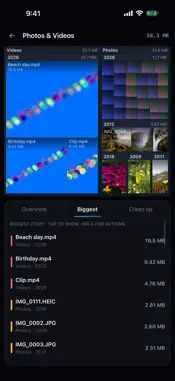
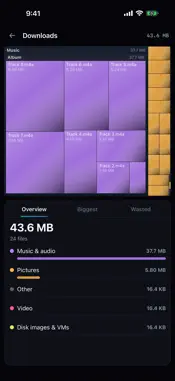
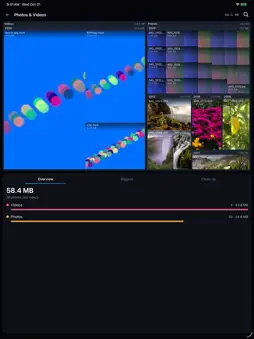
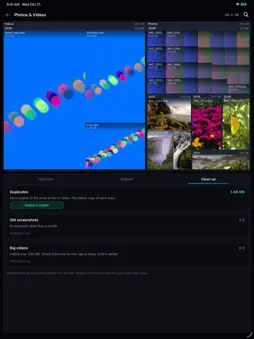
0Space shows you what's filling your iPhone and helps you get the space back. PHOTOS & VIDEOS Your library becomes a map: every photo and video is a tile sized by the space it takes, grouped into videos, screenshots, Live Photos and years, with real thumbnails. The big ones jump out at you. Tap a group to fly into it, tap a photo or video to see it full size, pinch to zoom, and hold any item to delete it. CLEAN UP • Duplicates: exact copies of the same photo or video. The oldest copy stays. • Similar photos: bursts and near-identical shots, one group at a time. Compare them side by side and zoomed in, keep the sharpest, delete the rest. • Old screenshots: everything older than a month, in one tap. • Big videos: the ones worth a look, biggest first. Anything you delete goes to Recently Deleted in Photos for 30 days, and iOS asks you before each delete. FILES Pick any folder in Files or iCloud Drive and map it the same way: the biggest files, wasted space and empty folders. 0Space remembers the folders you pick, so iCloud Drive and your apps' folders can be mapped together on one map. Tap a file to open it in Quick Look, or a ZIP to see what's inside without unpacking it. WIDGET & SIRI A free-space widget for your Home Screen and Lock Screen. Press and hold the 0Space icon for Clean up, My folders and Storage, or ask Siri "How much space is free in 0Space". SPACE REMINDERS Off unless you turn them on. About once a week, while your iPhone charges, 0Space checks for duplicates and old screenshots and lets you know on the day and hour you choose, only when there's at least 1 GB more to free. It never deletes anything by itself. PRIVATE No account, no ads, no analytics, no tracking. Nothing leaves your iPhone. From 0101 Inc. Also available for Windows, Mac and Android at 0101inc.com/0Space
What's New
Version 2026.11.1 2026-11-02
• See it full size: tap a photo or video on the map, or in Biggest, to open it. Swipe for the next one, pinch to zoom, and Play videos. • Files open in Quick Lo...• See it full size: tap a photo or video on the map, or in Biggest, to open it. Swipe for the next one, pinch to zoom, and Play videos. • Files open in Quick Look: pictures, videos, PDFs, text and Office documents. A ZIP shows what's inside without unpacking it. • Similar photos: bursts and near-identical shots, one group at a time. Compare them big, keep the sharpest, and delete the rest. • Space reminders, off unless you turn them on: a weekly note on the day and hour you pick, only when there's at least 1 GB more to free. • Files remembers the folders you pick: map iCloud Drive and your apps' folders one at a time, or all together on one map. • Tap the storage card on the start screen to see what's using your iPhone's space, and where to free more. • A free-space widget for your Home Screen and Lock Screen. • Quick actions (press and hold the icon) and Siri: "Clean up photos in 0Space", "How much space is free in 0Space". • Hidden photos now count toward your library's size, and stay locked. If you shared only some photos, 0Space says so. • A short welcome tour, and Help any time from the ? on the start screen. Technical Analysis
Package Overview Basic metadata
Bundle ID
com.0101inc.0space Current Version 2026.11.1
Minimum iOS 17.0
Package Size App Store Size
Package Metadata 0 / 0 version records
Detailed binary, privacy manifest, framework, and Info.plist results have not been indexed for this package yet. The verified App Store and archive metadata above remains available.
Developer Information
Known Version Records
0 version records with stored package metadata
Stored metadata does not guarantee a package is currently available to download.
| Details | Version / IDs | Version date | Action |
|---|