
Preview


Description
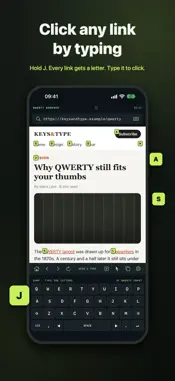
QWERTY Browser keeps a full keyboard on screen under every web page and lets that keyboard drive the page. You type, scroll, click and switch tabs from the keys, so your thumbs stay in the bottom half of the phone. JUMP TO ANY LINK • Hold J, or tap the letter-box button. Every visible link, button and field gets a short letter code. • Type the code to click it. ⌫ steps back, ↵ clicks the first match. • Swipe the keys to scroll, and the labels refresh for the new view. THE KEYBOARD IS THE CONTROLLER • Swipe the keys up or down to scroll the page. • Swipe sideways to move the text cursor one word at a time. • Pointer mode turns the keyboard into a trackpad. Swipe to aim and tap to click. Hold the pointer at the top or bottom edge to keep scrolling. A KEY MAP YOU OWN • Hold any letter A–Z to run its action: home, back, new tab, next tab, find on page, clip, desktop site, pointer mode or a bookmark. • The home screen shows a live key map, so you can see which keys are bound and what they do. • Bookmark tiles show the letter that opens them. TYPING THAT STAYS PUT • The QWERTY keyboard is always there. It doesn't slide over the page when you focus a field. • It types into the address bar and into ordinary web text fields. • A candidate bar learns your words on this device. Double-tap space for a period. • Switch to the iOS keyboard whenever you need it, for example for Chinese input or passwords. BROWSER BASICS, DONE PROPERLY • Tabs with session restore, history, find on page with match count, and a desktop-site toggle. • Clips: save selected text or an image with one hold. • Private tabs keep cookies off disk and visits out of history. A per-site cookie manager lets you clear data one site at a time. • Five themes, including Gunmetal with sculpted keycaps, plus key-click sounds and graded haptics. No accounts. No ads. No tracking. Your browsing data stays on this iPhone.
Technical Analysis
Package Overview Basic metadata
Bundle ID
com.yang.keysee Current Version 1.0
Minimum iOS 17.0
Package Size App Store Size
Package Metadata 0 / 0 version records
Detailed binary, privacy manifest, framework, and Info.plist results have not been indexed for this package yet. The verified App Store and archive metadata above remains available.
Developer Information
Known Version Records
0 version records with stored package metadata
Stored metadata does not guarantee a package is currently available to download.
| Details | Version / IDs | Version date | Action |
|---|