Preview



Description
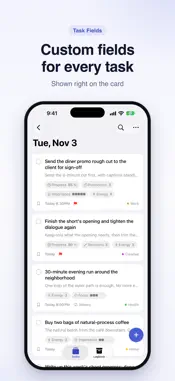
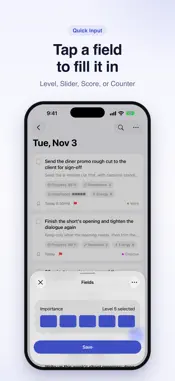
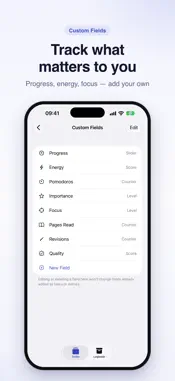
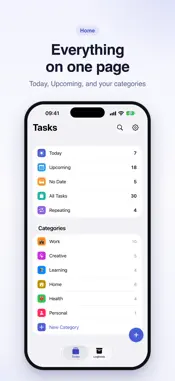
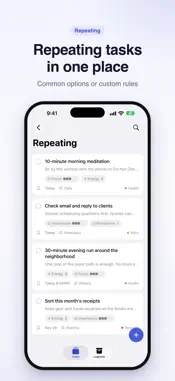
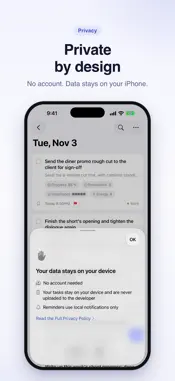
CardTask turns your to-dos into clear, simple cards. When you finish a task, it doesn't disappear — it becomes an entry in your Logbook, ready to look back on. CUSTOM FIELDS FOR EVERY TASK Add your own fields and fill them in as a Level, Slider, Score, or Counter: progress, time spent, mood, or a rating. When you complete a task, its fields stay with it in your Logbook. A LOGBOOK FOR WHAT YOU'VE DONE Completed tasks become entries automatically — or choose to keep a task out of the Logbook. All Entries is grouped by month, and you can file entries into categories and nested folders to find them later. HOME, ALL IN ONE PLACE Today, Upcoming, No Date, All Tasks, and your categories live on a single page. Tap + to add a task from anywhere. LIGHT CARDS, EVERYTHING AT A GLANCE Tap the circle to complete a task. Dates, categories, priorities, and fields appear right on the card — tap one to fill it in. Swipe left to plan the date and priority, change category, or delete; swipe right to add fields. RECENTLY DELETED Deleted something by mistake? Undo it right away, or bring it back from Recently Deleted within 30 days. HOME SCREEN WIDGET Keep today’s tasks on your Home Screen and check them off right there. Medium and large sizes; show Today, Upcoming, All Tasks, or one category. Free for everyone. REPEATING TASKS AND REMINDERS Pick a common repeat option or build a custom rule, and see every series under Repeating on Home. Reminders use on-device notifications. Search shows results as you type. PRIVATE BY DESIGN No account needed. Your tasks and entries stay on your iPhone and are never sent to the developer. Available in English, Simplified Chinese, and Traditional Chinese; times follow your iPhone's 12/24-hour setting. FREE AND PREMIUM Unlimited tasks and entries, with the core features free. The free version includes 2 fields per card and 2 Logbook levels. Premium is a one-time purchase with no subscription: up to 8 fields per card, 5 Logbook levels, custom folder symbols or emoji, and all 6 app icons.
What's New
Version 1.5.0 2026-11-04
1.5 brings a redesigned editor card and more timely overdue alerts. · Editor card: New Task, Edit Task, and Edit Entry now open as a floating card, with the tit...1.5 brings a redesigned editor card and more timely overdue alerts. · Editor card: New Task, Edit Task, and Edit Entry now open as a floating card, with the title and notes styled like your task cards. Added and available fields sit in one row of pills — tap one to fill it in. · The keyboard stays out of the way: it appears only when you tap the title or notes (except when creating a new task), not when you open existing content or fill in a field. · "Added to the Logbook when completed" is now a line at the bottom of the editor card — tap it to switch. · Task lists now use the system large title, and new tasks are always added with the + button. · Overdue on time: a task with a time is overdue as soon as that time passes; a task with only a date is overdue the next day. Red dates, the app icon badge, the widget, and the daily summary all follow this rule. · When sorted by Time, tasks with a time come first within the same day. Technical Analysis
Package Overview Basic metadata
Bundle ID
com.cardtask.app Current Version 1.5.0
Minimum iOS 18.0
Package Size App Store Size
Package Metadata 0 / 0 version records
Detailed binary, privacy manifest, framework, and Info.plist results have not been indexed for this package yet. The verified App Store and archive metadata above remains available.
Known Version Records
0 version records with stored package metadata
Stored metadata does not guarantee a package is currently available to download.
| Details | Version / IDs | Version date | Action |
|---|