
Preview








Description
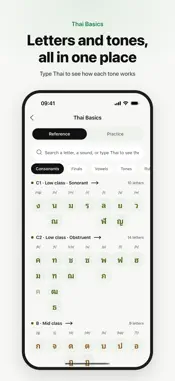
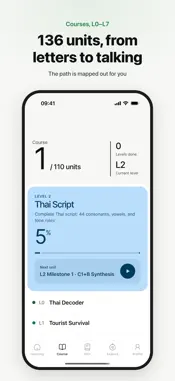
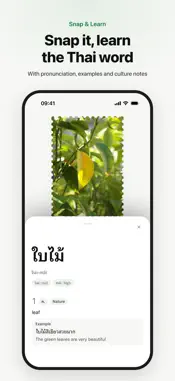
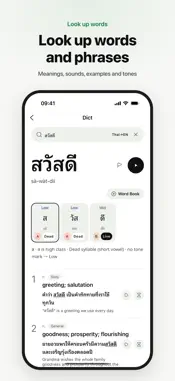
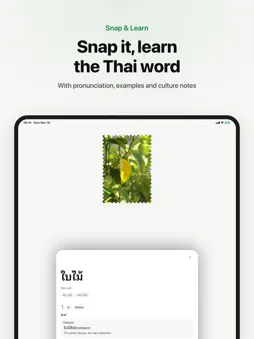
StudyThai is a Thai learning tool for English and Chinese speakers, taking you from your first sound to real conversation. A FRESH NEW LOOK, BUILT FOR IPAD AND IPHONE DUO A new design across the app. On iPad and an unfolded iPhone Duo, Settings, word lists, course units, word lookup, the AI tutor and more use two columns: pick on the left, see it on the right. STRUCTURED COURSES (L0-L7) 8 levels, 136 units, 672 sub-lessons and over 10,000 exercises, mapped out from the alphabet to fluency. Lessons include illustrated vocabulary cards, IPA, example sentences and grammar tips, with a quiz closing every unit. 17 EXERCISE TYPES Listen-and-choose, picture matching, sentence cloze, script assembly, tone identification, syllable segmentation, handwriting and speaking. Tones and unspaced Thai text each get their own drills. THAI BASICS: LOOK UP AND PRACTICE 44 consonants, final sounds, 32 vowels, 5 tones, spelling rules and pronunciation marks in one place. Type any Thai word to see how each syllable gets its tone. Free drills cover confusable sounds, long and short vowels, the five tones and letter fill-ins. MAI, YOUR AI THAI TUTOR Type or send a voice message in English, Chinese or broken Thai. Every Thai reply comes with a translation, native audio and tappable word cards. Say "let me practice ordering coffee" and Mai starts the scene in Thai, or ask for any scenario you like. Send a photo and Mai describes it in Thai. SNAP & LEARN Snap an object to get its Thai word, IPA, translation, examples and cultural notes in seconds. Snap a Thai sign or menu and tap any line for a full translation and word-by-word meanings. Captures are saved to My Photos by category. LOOK UP WORDS Look up words and phrases in Thai or English: meanings, multiple senses, IPA, a syllable-by-syllable tone breakdown and example sentences, with AI deep analysis when you want more. SMART VOCABULARY REVIEW Spaced repetition adapts to you — words you struggle with come back more often, and words you know can be marked as mastered. Saving words is free for everyone. Pro adds CEFR-level word lists and six topic lists: food, travel, medical, business, education, and nature. LISTEN MODE Pick a word list and it plays Thai word → meaning → example → translation, even on the Lock Screen. Review on the commute; adjust speed, repeats, pauses and a sleep timer. INTERACTIVE PRACTICE Matching, spelling and crossword-style activities built from the words you've learned — a different way to make vocabulary stick. AI SHORT-TEXT PRACTICE Pick a scene and AI writes a short Thai passage using the words you're reviewing, with quick comprehension questions, so you practice them in context. 8 THAI FONTS Switch Thai script from standard faces to display styles. Pro unlocks six more. ENGLISH AND CHINESE INTERFACE Full English, Simplified Chinese and Traditional Chinese interface, with translations, grammar notes and cultural context. FREE TO START 15 units are completely free: all five Level 0 units, four in Level 1, and the first unit of every level from Level 2 to Level 7. Saving words, word lookup, Thai Basics and interactive practice are free for everyone. Upgrade to Pro for all 136 units, unlimited AI tutor conversations, Pro word lists, unlimited Listen mode, and display fonts. SUBSCRIPTION INFORMATION StudyThai Pro is available as a monthly, yearly, or lifetime subscription. Payment will be charged to your Apple ID account at confirmation of purchase. Subscription automatically renews unless turned off at least 24 hours before the end of the current period. Your account will be charged for renewal within 24 hours prior to the end of the current period. You can manage and turn off auto-renewal by going to your Account Settings after purchase. Terms of Use (EULA): https://www.apple.com/legal/internet-services/itunes/dev/stdeula/ Privacy Policy: https://studythai.ai/privacy
What's New
Version 1.0.16 2026-11-16
1.0.16 is a big update: a fresh new look, support for iPhone Duo, and side-by-side layouts on iPad. It also adds Thai Basics, Listen mode and Traditional Chines...1.0.16 is a big update: a fresh new look, support for iPhone Duo, and side-by-side layouts on iPad. It also adds Thai Basics, Listen mode and Traditional Chinese, plus many improvements and fixes. A FRESH NEW LOOK Home, Courses, Vocab Review, word lookup, Mai · AI Tutor, training and Settings all have a new design. Answer feedback switches between Basics, Meanings and AI explain, toggles show a filled icon when on, and a new Mai animation plays while loading and while the AI is thinking. IPHONE DUO SUPPORT Unfold iPhone Duo and the app uses two columns: pick on the left, see it on the right, so looking up words, reviewing and practicing feel more natural. The tab bar moves to a sidebar. IPAD LAYOUTS On iPad, Settings, Messages, Mai · AI Tutor, My Photos, Learned Words, word lists, course units and word lookup use two columns. Course study cards sit side by side, and training setup puts Start at the top. THAI BASICS New on Home and in Explore: look up consonants, final sounds, vowels, tones, spelling rules and pronunciation marks in one place, and type Thai to see how each syllable gets its tone. Free drills cover confusable consonants and vowels, long and short vowels, the five tones, listen-and-pick and letter fill-ins. LISTEN MODE Pick a word list and it plays Thai word → meaning → example → translation on its own, even with the screen locked or in the background, with previous / next on the Lock Screen. Choose review, new, learned or all words; adjust repeats, speed, pauses and a sleep timer; it resumes where you left off. TRADITIONAL CHINESE Switch in Settings → General → Language. It's the default when your device uses Traditional Chinese. PROFILE AND SETTINGS Profile shows days learning Thai, words mastered, units completed and XP, with shortcuts to saved words, Learned Words, My Photos and Messages. Settings are regrouped into six sections, with Log Out at the bottom. SAVED WORDS AND WORD LISTS Saving a word opens a word list panel: add it to several of your lists at once or create one on the spot. Select several words in a list to mark them all as mastered. Imports skip words already in the list. MAI · AI TUTOR Voice messages send automatically when they reach the time limit. After you give AI consent, the message you just wrote is sent. SMOOTHER ANSWERING On smaller phones, questions and choices fit on one screen where possible, and each new question starts at the top. Skip and Submit sit at the bottom, and the input stays above the keyboard. COURSES Explanation card examples show large Thai with pronunciation below and play audio. "Your sentence" in Dialogue practice shows a full translation. Single-word speaking is scored on pronunciation accuracy. THAI TEXT Long Thai words shrink to fit instead of breaking mid-word, search suggestions no longer cut off Thai, and the target word in examples is underlined. PHOTO WORD LOOKUP My Photos shows how many words and scans you've saved. If the camera won't open, you can pick a photo from your library. SIGN-IN If Google sign-in won't open, you'll be offered an email code. Google or Apple accounts get a clear hint when signing in with a password. Verifying your email now signs you in. FIXES · Crash when picking a photo from the library on iOS 27.1 · Sidebar tab bar sometimes missing when opening the app on an unfolded iPhone Duo · Google sign-in could fail on iOS 27 · AI deep analysis in word lookup doing nothing when tapped before giving AI consent · Lower parts of ฎ and ฏ cut off in some Thai fonts · ำ overlapping tone marks · Letter training showing Chinese meanings in the English interface · Wrong pronunciation or word splitting for some words and example sentences (e.g. ฝาผนัง, ค็อด, มกราคม) Technical Analysis
Package Overview Basic metadata
Bundle ID
ai.studythai.mobile Current Version 1.0.16
Minimum iOS 15.1
Package Size App Store Size
Package Metadata 0 / 6 version records
Detailed binary, privacy manifest, framework, and Info.plist results have not been indexed for this package yet. The verified App Store and archive metadata above remains available.
Developer Information
Known Version Records
0 version records with stored package metadata • 6 known version records
Stored metadata does not guarantee a package is currently available to download.
| Details | Version / IDs | Version date | Action |
|---|---|---|---|
| Not archived | App Store ID: 887898431 | Unknown | Request Version |
| Not archived | App Store ID: 887149707 | Unknown | Request Version |
| Not archived | App Store ID: 886755079 | Unknown | Request Version |
| Not archived | App Store ID: 885770694 | Unknown | Request Version |
| Not archived | App Store ID: 885304816 | Unknown | Request Version |
| Not archived | App Store ID: 882608055 | Unknown | Request Version |