
Preview






Description
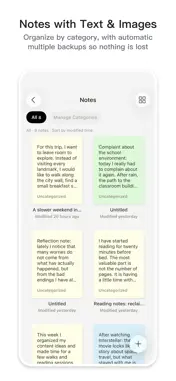
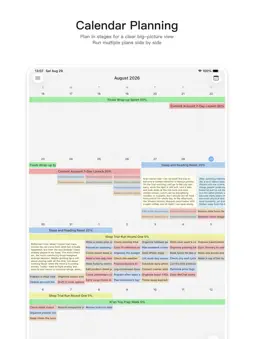
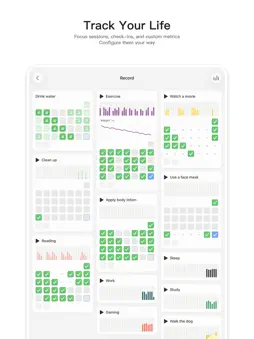
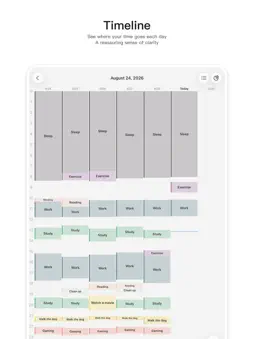
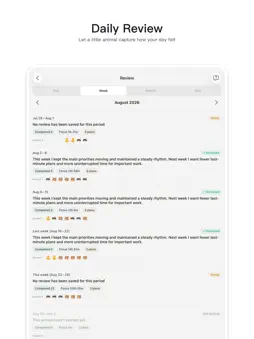
Plan your week with a clear view of what matters. iPlan brings daily tasks and multi-day plans together in one calendar, so you can see what’s coming, adjust your schedule, and follow your progress. Whether you’re planning a study week, working toward a personal goal, or making room for everyday life, start with the week ahead. MAKE A PLAN FOR YOUR WEEK See your tasks in a weekly view and decide what to work on each day. Drag tasks to another date when your schedule changes, and keep your week organized as you go. TURN BIGGER GOALS INTO DAILY STEPS Give a longer-term goal its own plan and keep related tasks together. Add subtasks to break work into smaller steps, set priorities, and schedule the next action. Use the calendar to see how your plans fit across days and weeks. SEE TIME AND PROGRESS TOGETHER Compare how much of a plan’s time has passed with how much you’ve completed. Get a clearer sense of where you stand and decide what needs your attention next. KEEP A RECORD OF YOUR EFFORT Track time spent on activities, check in on habits, and log values that matter to you. Look back at your daily timeline to see where your time went. CAPTURE IDEAS ALONG THE WAY Save notes with text and photos, then organize them by category. Keep ideas, useful details, and everyday moments close at hand. Start with one plan. Add the next few tasks. Make this week a step toward what matters to you. Privacy Policy https://mokkaiox.com/en/stepia/privacy/ Terms of Use https://mokkaiox.com/en/stepia/terms/
What's New
Version 5.8 2026-11-21
- Improved subtask alignment in task details - Completed tasks and subtasks now appear with a strikethrough in task details - Completed subtasks now appear with...- Improved subtask alignment in task details - Completed tasks and subtasks now appear with a strikethrough in task details - Completed subtasks now appear with a strikethrough in the task list - Swipe left or right in the notes list to switch categories - Create an event while adding a past entry to the timeline - Tap an event on the timeline to delete it - New notes now have a white background by default - Added three video tutorials for the timeline Technical Analysis
Package Overview Basic metadata
Bundle ID
mokkaio.Phased Current Version 5.8
Minimum iOS 18.0
Package Size App Store Size
Package Metadata 0 / 7 version records
Detailed binary, privacy manifest, framework, and Info.plist results have not been indexed for this package yet. The verified App Store and archive metadata above remains available.
Known Version Records
0 version records with stored package metadata • 7 known version records
Stored metadata does not guarantee a package is currently available to download.
| Details | Version / IDs | Version date | Action |
|---|---|---|---|
| Not archived | App Store ID: 888223001 | Unknown | Request Version |
| Not archived | App Store ID: 887854539 | Unknown | Request Version |
| Not archived | App Store ID: 887617965 | Unknown | Request Version |
| Not archived | App Store ID: 886557889 | Unknown | Request Version |
| Not archived | App Store ID: 886321772 | Unknown | Request Version |
| Not archived | App Store ID: 885741247 | Unknown | Request Version |
| Not archived | App Store ID: 883130841 | Unknown | Request Version |