Preview





Description
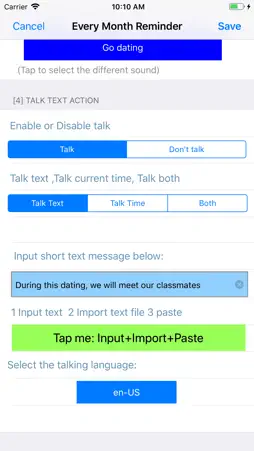
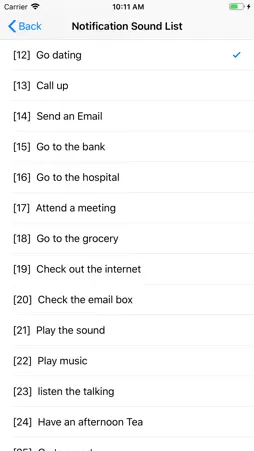
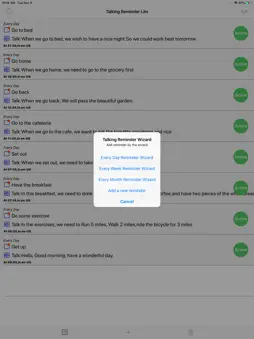
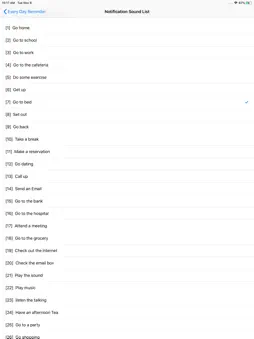
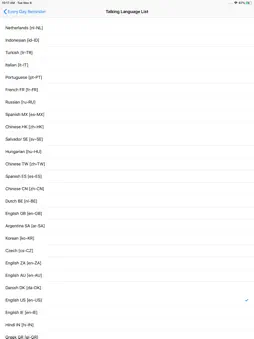
Main Features: 1. Run the reminder at the indicted time 2 When the App is launched, the reminder could talk the text in more than 20 international languages at the indicted time. 3 When the device is locked or the user is using other App, the App could reminder the user by playing 26 talking sounds in English and also display the message in the notification bar. 4 The App includes the following six standard time reminders:One Time reminder, every hour reminder, every day reminder, every week reminder, every month reminder, Interval reminder. Detail features: 1 import the text from the paste board, soft keyboard or text file. 2 In the main list, each table cell contains one cycle button at the right side, after tapping the right button,the user could change the reminder status between active and sleep. In the sleep status, the reminder will be ignored. 3 When the reminder record is running, the right button will be stop button. So tap the stop button could stop the current reminder job. 4 The user could select the talking speed from the setting view. 5 The user could control the talking volume from the setting view. 6 In the main list view, at the tool bar, the right one is the wizard button. Tap the wizard button, the user could select the every day template, every week template or the every month template. 7 In the main list view, at the tool bar, the left one is the clear button. Tap the clear button, the user could delete all the reminder records from the database and the notification list. Screen shots description: in the screen shot, if there are only one main title line in each cell , the notification sound is the default iOS sound and only the talking text is displayed. If there are two main title lines in each cell of the main list view, one line is for the talking notification sound. the other line is for the talking text. In the main list view, if we tap the + button at the bottom tool bar, the menu list is displayed. From this menu, the user could select the reminder type. In the main list view, if one reminder event cell is displayed, and we tap the active button, the status of the event will be changed to sleep status. The lite edition includes the iOS default notification sound and 26 talking sounds in English. Below is the notification sounds list: 0 iOS default Notification Sound 1 Go home 2 Go to school 3 Go to work 4 Go to the cafeteria 5 Do some exercise 6 Get up 7 Go to bed 8 Set out 9 Go back 10 Take a break 11 Make a reservation 12 Go dating 13 Call up 14 Send an Email 15 Go to the bank 16 Go to the hospital 17 Attend a meeting 18 Go to the grocery 19 Check out the internet 20 Check the email box 21 Play the sound 22 Play music 23 listen the talking 24 Have an afternoon Tea 25 Go to a party 26 Go shopping
What's New
Version 5.4.0 2024-07-09
1. Update the default preference of the talking volume as the high level instead of loudest level. Our user could update the preference from the setting view. 2...1. Update the default preference of the talking volume as the high level instead of loudest level. Our user could update the preference from the setting view. 2. Bug fixes. Technical Analysis
Package Overview Basic metadata
Bundle ID
fangshen.Talking-Reminder-Free Current Version 5.4.0
Minimum iOS 12.0
Package Size App Store Size
Package Metadata 1 / 13 version records
1.0 / 5.0 (2 ratings)
Detailed binary, privacy manifest, framework, and Info.plist results have not been indexed for this package yet. The verified App Store and archive metadata above remains available.
Known Version Records
1 version record with stored package metadata • 13 known version records
Stored metadata does not guarantee a package is currently available to download.
| Details | Version / IDs | Version date | Action |
|---|---|---|---|
 9.23 MB | v5.4.0 App Store ID: 866014299Build: 5.4.0 | 2024-07-08 09:59:22 | Get Version |
| Not archived | App Store ID: 859191511 | Unknown | Request Version |
| Not archived | App Store ID: 853221956 | Unknown | Request Version |
| Not archived | App Store ID: 852925992 | Unknown | Request Version |
| Not archived | App Store ID: 839291595 | Unknown | Request Version |
| Not archived | App Store ID: 829858217 | Unknown | Request Version |
| Not archived | App Store ID: 826746552 | Unknown | Request Version |
| Not archived | App Store ID: 818167578 | Unknown | Request Version |
| Not archived | App Store ID: 817867650 | Unknown | Request Version |
| Not archived | App Store ID: 817544062 | Unknown | Request Version |
| Not archived | App Store ID: 813200567 | Unknown | Request Version |
| Not archived | App Store ID: 812925416 | Unknown | Request Version |
| Not archived | App Store ID: 740612706 | Unknown | Request Version |