
Preview





Description
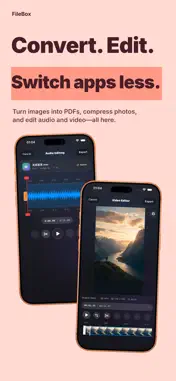
File Box combines file management, media playback, PDF tools, ebook and comic reading in one app. Organize, view and work with your files on iPhone and iPad. Store files in the app, lock it with Face ID or a password, or grant access to system folders and iCloud Drive. Keep work documents, photos, videos, music, ebooks and comics in your own “Box,” ready to open anytime. Keep your files organized • Switch between the main space and a separate private space from the bottom menu. • Browse, play and manage files in authorized system folders with “On My iPhone/iPad,” without importing them. • Manage cloud files with “My iCloud.” Authorize iCloud Drive folders and download files as needed to read, play or process them. • Import, move, copy, batch rename, search and share. Filter by tag and file type. • Customize folder colors, icons and images. • Create ZIP archives with optional password protection. Extract ZIP, RAR, 7Z, TAR, GZ, BZ2, XZ, TAR.GZ and other formats, including common encrypted archives. • View storage usage by file type, large files and duplicates, including in authorized system folders. Enjoy videos and music • Play MP4, MOV, MKV, AVI, WebM and other common video formats, with audio track switching and Picture in Picture. • Use dual or external subtitles, customize their style and cast videos to compatible TVs. • View artwork and lyrics in the audio player. Read ebooks and text • Read EPUB and unencrypted MOBI with a table of contents, bookmarks, search and saved reading progress. • Adjust font size, layout and reading themes. • Read and edit TXT documents, and add bookmarks. Scan, read and edit PDFs • Scan with the camera or import images. Correct crops, arrange multiple images and use common ID sizes. OCR creates PDFs with searchable, copyable text. • Read PDFs with a table of contents, thumbnails, bookmarks, full-text search and saved reading progress. • Choose continuous scrolling, horizontal paging, two-page view, margin cropping and paper colors. • Organize, merge and split PDFs. Reorder, rotate, insert or delete pages, and export JPG or PNG images. • Add handwritten annotations, text highlights, handwritten signatures and text watermarks. Set, change or remove PDF passwords. • Turn multiple images into a PDF, with ordering, watermarks and password protection. Read and create comics • Read CBZ and CBR comics or open image folders as comics. • Create CBZ comics with optional passwords and text watermarks. Redact images and share with confidence • Detect faces, QR codes, names, phone numbers and amounts on your device. Choose categories to redact. • Select areas manually, apply blur, pixelation or other styles, and add text watermarks. • Erase text on solid-color backgrounds. • Choose “Redact Image” from the Photos share sheet and save the result to Photos. Handy tools • View, edit and batch compress images. Create long screenshots from web pages, multiple images or screen recordings. • Trim, split, join and convert audio, or extract audio from video. • Edit audio artwork, song details and lyrics in batches. • Crop and trim videos, and convert between MP4 and MOV. • Convert static WebP to JPG, animated WebP to GIF, Live Photo or video, and GIFs and Live Photos to each other or video. Transfer across devices • Send and receive files with nearby devices using Nearby Transfer. • Upload, download, manage and preview files in a computer browser over local Wi-Fi. • Record on Apple Watch and sync to iPhone. • Import files shared from other apps. Use drag and drop and multitasking for browsing and playback. Choose a monthly or yearly subscription, or a lifetime purchase. Your files. Your device. Your “Box.” Terms of Use (EULA): https://www.apple.com/legal/internet-services/itunes/dev/stdeula/ Privacy Policy: https://filebox.dogegg.cc/privacy
What's New
Version 1.0.43 2026-11-13
1. Added WAV support for audio metadata editing. 2. Added a data repair mode to clear caches, reset the database, and export all files. 3. Optimized startup and...1. Added WAV support for audio metadata editing. 2. Added a data repair mode to clear caches, reset the database, and export all files. 3. Optimized startup and file indexing to reduce memory usage with large file collections. 4. Fixed a potential crash when pasting large amounts of text in the text editor. Technical Analysis
Package Overview Basic metadata
Bundle ID
cc.dogegg.filebox Current Version 1.0.43
Minimum iOS 17
Package Size App Store Size
Package Metadata 0 / 14 version records
Detailed binary, privacy manifest, framework, and Info.plist results have not been indexed for this package yet. The verified App Store and archive metadata above remains available.
Developer Information
Known Version Records
0 version records with stored package metadata • 14 known version records
Stored metadata does not guarantee a package is currently available to download.
| Details | Version / IDs | Version date | Action |
|---|---|---|---|
| Not archived | App Store ID: 887855183 | Unknown | Request Version |
| Not archived | App Store ID: 887723777 | Unknown | Request Version |
| Not archived | App Store ID: 887546370 | Unknown | Request Version |
| Not archived | App Store ID: 887328309 | Unknown | Request Version |
| Not archived | App Store ID: 887250783 | Unknown | Request Version |
| Not archived | App Store ID: 887065940 | Unknown | Request Version |
| Not archived | App Store ID: 886787261 | Unknown | Request Version |
| Not archived | App Store ID: 886360216 | Unknown | Request Version |
| Not archived | App Store ID: 886135367 | Unknown | Request Version |
| Not archived | App Store ID: 886012294 | Unknown | Request Version |
| Not archived | App Store ID: 885856305 | Unknown | Request Version |
| Not archived | App Store ID: 885752328 | Unknown | Request Version |
| Not archived | App Store ID: 885597903 | Unknown | Request Version |
| Not archived | App Store ID: 885177336 | Unknown | Request Version |