
Preview




Description
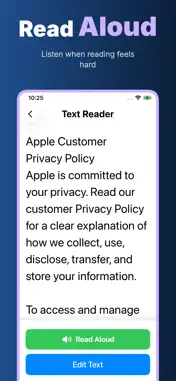
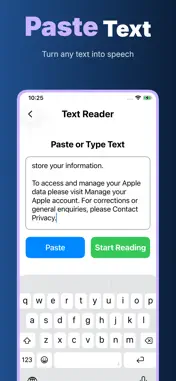
EasyLook is a simple magnifier, big-text reader, and reminder app made for seniors, people with changing vision, and anyone who wants daily reading to feel clearer and less tiring. It is designed for ordinary moments: reading a medicine label, checking a bill, looking at a package, reading a notice, following a message from family, or setting a gentle reminder before the day gets busy. The app is built around five clear promises: Offline, No Login, Privacy First, On Device, No Cloud Upload. EasyLook does not require an account before you can use it. It does not ask you to sign in just to read small text. Its core reading, magnifier, settings, and reminder workflows are designed to stay on your iPhone, with no online account, cloud profile, or remote document library to manage. What EasyLook helps with: * Magnifier for small print Use the camera as a clear, full-screen magnifier. Move the zoom slider from 1x to 5x, turn on the flashlight in a dim room, and look more comfortably at labels, instructions, menus, receipts, packaging, pill bottles, appliance panels, forms, and everyday fine print. The controls are large, direct, and easy to tap. * Big-text reader Paste or type text into the reader and view it in a calm layout with large type and generous line spacing. This is useful for long messages, copied instructions, policy text, appointment notes, addresses, phone numbers, or anything that feels cramped on a normal screen. When reading with your eyes is tiring, use Read Aloud, Pause, Resume, and Stop controls to listen instead. * Helpful reminders Create simple reminders for medicine, rest, phone calls, and other daily routines. Choose a time, add a note such as before meal, after meal, or dosage, and keep important reminders visible. EasyLook is not a medical diagnosis or treatment tool; it is a practical timer and reminder helper for everyday care routines. * Comfortable settings Choose a text size that feels right: Standard, Large, or Extra Large. Select a contrast mode for different lighting and vision needs: black on white, white on black, or yellow on black. Settings are safe and reversible, so the app can be adjusted without fear of breaking anything. * Simple home screen EasyLook keeps the main actions easy to find: Magnifier, Reader, Reminders, Help, and Settings. The interface uses large buttons, clear labels, and a quiet layout so a parent, grandparent, caregiver, or first-time iPhone user can understand where to go without searching through many tabs. Why privacy matters here Reading and reminder data can be personal. A medicine name, a pasted message, a document excerpt, a reminder note, or a photo of a label may reveal private daily details. EasyLook is designed to avoid unnecessary accounts and unnecessary cloud upload. You should be able to use a reading helper without turning small private moments into online data. Offline: core features are made for everyday use without depending on a web account. No Login: open the app and start using the magnifier, reader, settings, and reminders without registration. Privacy First: the product is designed around clarity and user control, not data collection. On Device: reading text, reminder storage, display settings, and camera magnification happen on your device. No Cloud Upload: EasyLook does not upload your reading text, reminder list, or magnifier use to its own cloud. EasyLook helps at home, in stores, while traveling, or when supporting an older family member: make text bigger, read comfortably, hear text aloud, remember important times, and keep the experience private. Privacy Policy https://5gotogo.github.io/EasyLook-privacy/privacy-policy.html Terms of Use https://www.apple.com/legal/internet-services/itunes/dev/stdeula/
What's New
Version 1.0.3 2026-10-13
Bug fixes and performance improvements. Technical Analysis
Package Overview Basic metadata
Bundle ID
com.daa.bao.EasyLook Current Version 1.0.3
Minimum iOS 17.6
Package Size App Store Size
Package Metadata 0 / 3 version records
Detailed binary, privacy manifest, framework, and Info.plist results have not been indexed for this package yet. The verified App Store and archive metadata above remains available.
Developer Information
Known Version Records
0 version records with stored package metadata • 3 known version records
Stored metadata does not guarantee a package is currently available to download.
| Details | Version / IDs | Version date | Action |
|---|---|---|---|
| Not archived | App Store ID: 886038770 | Unknown | Request Version |
| Not archived | App Store ID: 882265771 | Unknown | Request Version |
| Not archived | App Store ID: 881441499 | Unknown | Request Version |