
Preview








Description
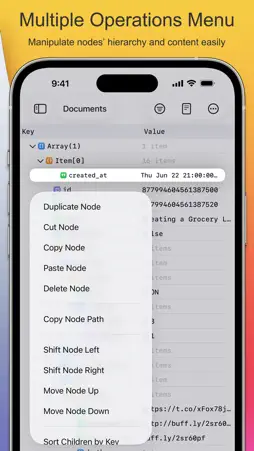
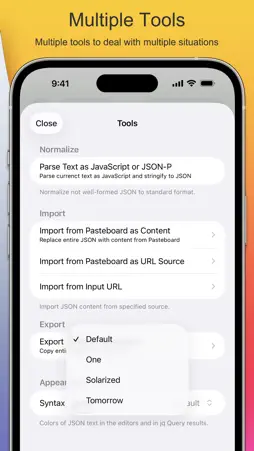
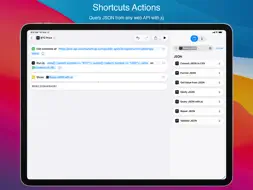
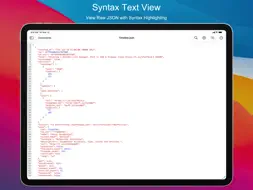
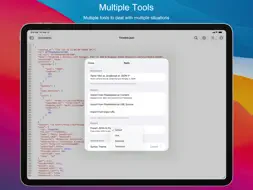
Power JSON Editor Mobile is a JSON editor for app and web developers on iPhone and iPad. Open JSON files from Files or any other app, explore them in a tree, edit them as text, query them with jq, and automate JSON tasks with Shortcuts. It works well with an external keyboard. √ Document Browser - Browse, create and organize JSON files like in the Files app - Open JSON files saved by other apps, on your device or in iCloud Drive - Keep several files open and switch between them √ Tree Editor - See the structure of a JSON document in a tree, with the type and number of children of each node - Add nodes from the toolbar; duplicate, cut, copy, paste, delete, move and sort them from the node menu - Copy the JSON path of a node - Edit a node in its own editor, with syntax highlighting for objects and arrays - Undo and redo √ Text Editor - Syntax highlighting that stays fast in large documents - The first syntax error is marked while you type - Line numbers, find and replace, and a keyboard bar with JSON keys - Syntax themes: Default, One, Solarized and Tomorrow, each in light and dark mode √ jq Query - Run jq filters on the current document, the result updates as you type - Pretty, compact or raw output - Copy or share the result, or apply it to the document - Large numbers keep their exact digits √ Shortcuts Actions - Query JSON with jq, Get Value from JSON, Format JSON, Minify JSON, Validate JSON, Convert JSON to CSV and Repair JSON - Actions run in the background without opening the app - Combine them with Get Contents of URL to read values from any web API - Ask Siri or use Spotlight to query, format, minify and validate JSON √ Tools - Format, minify and sort the keys of a document - Import JSON from the pasteboard or from a URL, export it to the pasteboard - Parse JavaScript object literals and JSON-P into JSON √ Keyboard Ready - Cmd+J jq Query, Cmd+Option+T switch between tree and text, Cmd+Option+F format, Cmd+Option+M minify, Cmd+Option+K sort keys, Cmd+F find Viewing JSON, jq Query, copying JSON and the Shortcuts actions are free. Saving changes, the import tools, syntax themes and editor settings require the Full Version in-app purchase. For more information, visit https://powerjsonapp.com/
What's New
Version 1.9.0 2026-11-14
New - jq Query, free for everyone: run jq filters on the current document with live results, then copy, share or apply the result (Cmd+J) - Shortcuts actions, f...New - jq Query, free for everyone: run jq filters on the current document with live results, then copy, share or apply the result (Cmd+J) - Shortcuts actions, free for everyone: Query JSON with jq, Get Value from JSON, Format JSON, Minify JSON, Validate JSON, Convert JSON to CSV and Repair JSON. They run in the background without opening the app - Siri and Spotlight shortcuts for querying, formatting, minifying and validating JSON - Syntax themes: choose Default, One, Solarized or Tomorrow in Tools - Format JSON, Minify JSON, Sort Keys and Copy JSON in the More menu, with keyboard shortcuts Improvements - Syntax highlighting in the node editor and in jq Query results - Faster syntax highlighting in the text editor for documents of any size, and the first syntax error is marked while you type - Large numbers keep their exact digits when formatting or querying - Compact icon buttons in the navigation bar; on iPhone, Find and Replace moved into the More menu - ":" and "," keys in the keyboard bar of the text editor - Search highlights are readable in Dark Mode - Export JSON to Pasteboard in Tools no longer needs the Full Version - Buying and restoring the Full Version use the current App Store purchase system; purchases approved through Ask to Buy or made on another device unlock the app right away - PowerJSON now requires iOS 15 or later Fixes - Documents opened with an empty tree on iOS 26 - The add-node buttons and the keyboard bar did not fit the screen on iOS 26 - An extra tab bar appeared above the editor on iPadOS 18 and later - The unlock prompt did not appear when using tools in the free version - A possible crash when autosaving a document without content Technical Analysis
Package Overview Package analysis available
Bundle ID
com.xujiwei.powerjsoneditor.ios Current Version 1.9.0
Minimum iOS 15.0
Package Size App Store Size
Package Metadata 2 / 12 version records
AFNetworking
com.alamofire.AFNetworking v1.8.2iOS 9.0+522.84 KB
HUDHelper
org.cocoapods.HUDHelper v1.8.2iOS 8.0+106.77 KB
Masonry
org.cocoapods.Masonry v1.8.2iOS 8.0+223.04 KB
MBProgressHUD
org.cocoapods.MBProgressHUD v1.8.2iOS 8.0+163.62 KB
OpenSSL
com.github.krzyzanowskim.OpenSSL v1.8.2iOS 9.0+2.49 MB
PAPreferences
org.cocoapods.PAPreferences v1.8.2iOS 8.0+118.89 KB
3.2 / 5.0 (10 ratings)
Known Version Records
2 version records with stored package metadata • 12 known version records
Stored metadata does not guarantee a package is currently available to download.
| Details | Version / IDs | Version date | Action |
|---|---|---|---|
 4.02 MB | v1.8.2 App Store ID: 845522360Build: 808 | 2021-11-23 09:15:10 | Get Version |
| Not archived | App Store ID: 845039793 | Unknown | Request Version |
| Not archived | App Store ID: 844206639 | Unknown | Request Version |
| Not archived | App Store ID: 843722163 | Unknown | Request Version |
| Not archived | App Store ID: 843690379 | Unknown | Request Version |
| Not archived | App Store ID: 842335898 | Unknown | Request Version |
| Not archived | App Store ID: 842131288 | Unknown | Request Version |
| Not archived | App Store ID: 842021663 | Unknown | Request Version |
| Not archived | App Store ID: 841272655 | Unknown | Request Version |
| Not archived | App Store ID: 841097317 | Unknown | Request Version |
| Not archived | App Store ID: 840884939 | Unknown | Request Version |
 2.83 MB | v1.0 App Store ID: 840806545Build: 1.0.528 | 2021-03-13 05:30:54 | Get Version |