Preview




Description
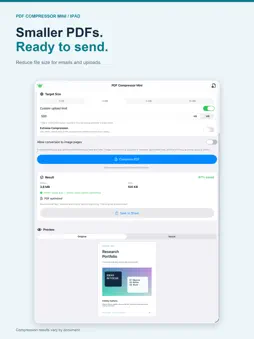
A PDF that is too large can hold up an application, an email or an upload. PDF Compressor Mini helps you shrink supported PDF files, check the result and save a separate copy. COMPRESS PDF FILES Open a PDF and choose High, Balanced or Small quality. Standard optimization reduces supported embedded images while retaining searchable text and links. Some PDFs are already optimized and may not become smaller. WORK TOWARD YOUR UPLOAD LIMIT Full Access unlocks Target Size mode. Choose 1 MB, 2 MB, 5 MB or 10 MB, or enter a custom limit in KB or MB, including 500 KB. See the original size, result size and whether the result meets your chosen limit. Not every file can reach every target. Confirm the receiving website's actual requirements. COMPARE BEFORE YOU SEND Switch between the original and result, zoom in and check small text, stamps and charts. If more reduction is needed, you can explicitly allow conversion to image pages. This removes searchable text, links and forms and may reduce clarity. Extreme Compression, available with Full Access, uses lower-resolution image pages. ON IPHONE AND IPAD Import a PDF from Files, review it in the app, then save or share the result using system options. Compression runs in the background with progress and cancellation controls. LOCAL PROCESSING PDF processing takes place on your device. The app does not upload your PDF files to a server, does not require an account, and has no ads or tracking. Apple's services handle purchases and purchase restoration. FREE QUALITY MODE AND FULL ACCESS Quality compression is available without purchasing Full Access. A one-time, non-consumable purchase unlocks Target Size and Extreme Compression. No subscription is required. Check the in-app purchase screen for your local price. IMPORTANT LIMITS Encrypted, password-protected PDFs and documents with digital-signature fields are not supported. The original file is preserved. Review every exported document before submitting it, especially if you enable image-page conversion. This version processes one PDF at a time.
Technical Analysis
Package Overview Basic metadata
Bundle ID
com.ourcoders.PDFCompressorMini Current Version 1.0
Minimum iOS 16.2
Package Size App Store Size
Package Metadata 0 / 0 version records
Detailed binary, privacy manifest, framework, and Info.plist results have not been indexed for this package yet. The verified App Store and archive metadata above remains available.
Known Version Records
0 version records with stored package metadata
Stored metadata does not guarantee a package is currently available to download.
| Details | Version / IDs | Version date | Action |
|---|