
Preview







Description
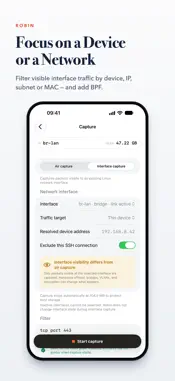
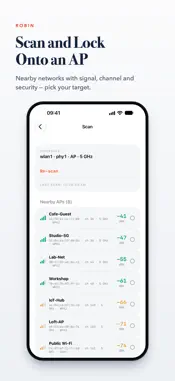
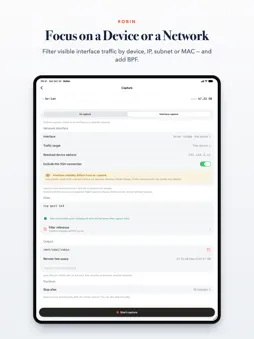
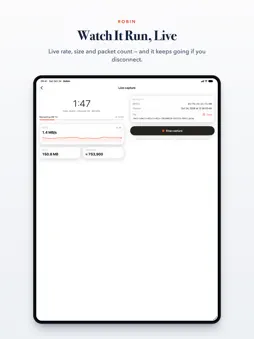
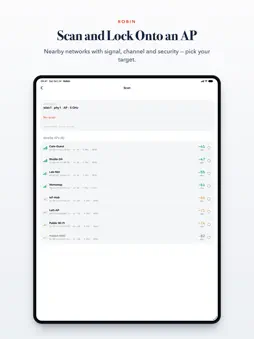
Robin turns your iPhone or iPad into a control panel for remote packet capture. It connects over SSH to your own OpenWrt router or Linux host, runs tcpdump remotely, and sends a standard pcap straight back to your iPhone or iPad. Robin offers two capture sources: • Air capture — use monitor mode on a compatible Wi-Fi radio to capture 802.11 frames. Robin can scan nearby access points and configure the radio, channel, and width. • Interface capture — capture packets visible to an existing Linux interface such as br-lan or eth0. Monitor-mode support is not required, and Robin does not change the interface state. Robin does not require jailbreaking your iPhone or iPad or attaching a USB Wi-Fi adapter to it. The capture runs on the remote host; your iPhone or iPad handles connection, detection, configuration, control, and download. Robin is not a generic SSH client. It is a guided workflow built for remote packet capture: • Connect — securely over SSH with password or Ed25519/RSA key authentication. Passphrase-protected private keys are supported, and host keys are pinned on first use. • Detect — check whether air and interface capture are available, including radios, Linux interfaces, required tools, and permissions. • Configure — choose a capture source, channel, or network interface, then add an optional BPF filter, stop timer, and output directory. • Focus — narrow interface captures to this device’s address as seen by the SSH server, a specific IP address, a CIDR network, or a MAC address, and combine the scope with BPF. Only traffic visible at the selected interface can be captured. • Filter — get basic BPF validation as you type, with common examples, a combination builder, and a syntax reference. • Capture — start a detached tcpdump task that keeps running if SSH disconnects. Interface capture excludes the current SSH control connection by default and has a protective file-size limit. • Download — pull the .pcap to your iPhone or iPad and open it in Wireshark or your tool of choice. ROOM TO WORK: View lists and details side by side on wider screens such as iPad. Your selection and capture state stay in place when you resize. Live metrics and controls adapt to the available space, with support for larger text. WORKS WITH: • OpenWrt routers, usually with root login • Regular Linux hosts using an existing active network interface • A monitor-mode-compatible Wi-Fi radio for air capture; interface capture does not require one • Root, file capabilities, passwordless sudo, or password-based sudo • Standard Dropbear / OpenSSH targets, with no SFTP required BUILT FOR: Network engineers, Wi-Fi troubleshooters, and security researchers who need a fast, portable way to collect pcaps from infrastructure they own or are authorized to test. GOOD TO KNOW: • Try capture free for 7 days, then unlock Start Capture with a one-time Robin Pro purchase. Connection, scanning, health checks, history, and file browsing remain free. • Robin requires an SSH-accessible remote device with tcpdump. Only air capture requires Wi-Fi monitor mode. • Captures survive SSH disconnects and can be resumed after reconnecting. • Credentials are stored in the iOS Keychain, never on the remote device. • Air capture on a single-radio router may drop your Wi-Fi control link. Interface capture does not switch the radio mode, and Robin warns you when the air-capture risk applies. Robin is a capture and transfer tool. Use it only on networks you own or have explicit permission to test. Capturing traffic on networks without authorization may be illegal in your jurisdiction.
What's New
Version 1.8 2026-10-24
More focused remote captures, with layouts that fit your screen: • Interface capture now supports all visible traffic, this device's address as seen by the SSH...More focused remote captures, with layouts that fit your screen: • Interface capture now supports all visible traffic, this device's address as seen by the SSH server, a specific IP address, a CIDR network, or a MAC address. Combine a traffic scope with your BPF filter. Captures remain limited to traffic visible at the selected remote interface. • Traffic scopes and resolved target addresses are saved with each capture and shown in live status, history, and capture details. • Improved iPhone and iPad navigation, including side-by-side lists and details on wider screens. Resizing preserves your selection and capture state. • Improved foldable-screen layouts and larger text support, with live metrics and controls adapting to the available space. • Protected file operations prevent deletion, renaming, or duplicate downloads while a transfer or remote cleanup is in progress. Technical Analysis
Package Overview Basic metadata
Bundle ID
com.xingbo.robin Current Version 1.8
Minimum iOS 17.0
Package Size App Store Size
Package Metadata 1 / 6 version records
Detailed binary, privacy manifest, framework, and Info.plist results have not been indexed for this package yet. The verified App Store and archive metadata above remains available.
Known Version Records
1 version record with stored package metadata • 6 known version records
Stored metadata does not guarantee a package is currently available to download.
| Details | Version / IDs | Version date | Action |
|---|---|---|---|
| 11.85 MB | v1.7 App Store ID: 887863728Build: 1.7 | 2026-08-27 02:18:22 | Get Version |
| Not archived | App Store ID: 887553552 | Unknown | Request Version |
| Not archived | App Store ID: 887244551 | Unknown | Request Version |
| Not archived | App Store ID: 886938570 | Unknown | Request Version |
| Not archived | App Store ID: 886643589 | Unknown | Request Version |
| Not archived | App Store ID: 886327583 | Unknown | Request Version |