
Preview








Description
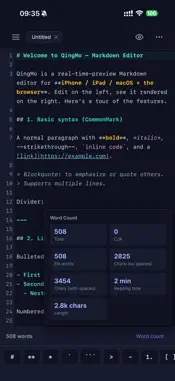
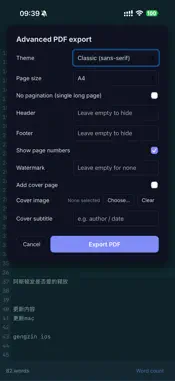
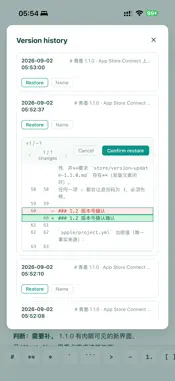
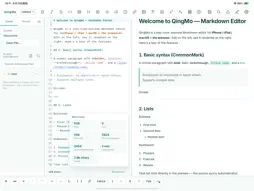
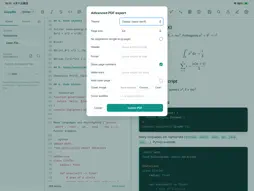
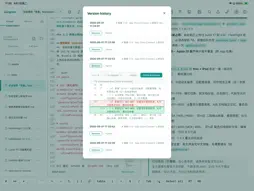
QingMo is a cross-platform Markdown editor built for a smooth writing flow. Edit on the left, see the rendered result on the right in real time — no more switching back and forth between syntax and output. — Live Preview — Rendering kicks in the moment you stop typing, with millisecond response. Switch freely between source, split, and preview modes. In split mode the editor and preview scroll in sync, so you never lose your place in long documents. — Navigate Long Documents — - Minimap: a structural overview on the right edge, color-coded by headings, body, and code. Click or drag to jump — accurate even with soft wrapping. - Sticky Header: keeps the full heading path of your current position pinned at the top while scrolling; click any level to jump back. - Two-way Linked Highlight: select text on one side and the matching text on the other is highlighted automatically. (All optional, toggleable in Settings, off by default.) — Full Markdown Support — - CommonMark: headings, emphasis, lists, quotes, links, images, rules - GitHub Flavored Markdown: tables, task lists, strikethrough, autolinks - KaTeX math: inline $...$ and block $$...$$, rendered offline - Superscript and subscript for chemical formulas and math notes - Syntax highlighting for dozens of languages: Python, Swift, Rust, Go, Java, JavaScript, SQL, and more — Fast Input — One-tap toolbar for bold, headings, lists, tables, formulas and more. On mobile, a quick-symbol bar sits above the keyboard so hard-to-type characters are always within reach. Full keyboard shortcuts for external keyboard users. — Consistent Across Devices + iCloud Sync — iPhone, iPad, and Mac share the same rendering core for consistent results everywhere. Turn on iCloud and your documents sync automatically across devices signed in to your Apple ID. — Handy File Management — A built-in file explorer: create, rename, delete, duplicate, and drag items into folders. Export to PDF or a single self-contained HTML file for easy sharing and archiving. — Privacy First — QingMo collects no personal data and contains no ads or trackers. Your documents stay in the local folder you choose or in your own iCloud container. — QingMo Pro (optional) — The core writing experience is free forever. A one-time QingMo Pro purchase (no subscription) unlocks advanced extras: - Mermaid diagrams (flowcharts, sequences, Gantt) - One-tap publishing and Chinese typography tools (auto spacing, simplified/traditional conversion) - Advanced PDF export (themes, headers/footers, page numbers, watermark, cover) and long-image export - Version history, detailed word count, focus mode, and image archiving Purchase is handled entirely by the App Store, and "Restore Purchases" is available. Whether you are writing technical notes, organizing to-dos, drafting papers, or capturing ideas, QingMo keeps you focused on the content.
What's New
Version 1.1.2 2026-10-26
QingMo 1.1.2 - Smoother indentation, a more accurate minimap, more reliable restore New - Outdent shortcut (Cmd + [): select one or more lines and press to rem...QingMo 1.1.2 - Smoother indentation, a more accurate minimap, more reliable restore New - Outdent shortcut (Cmd + [): select one or more lines and press to remove one indentation level, the exact inverse of Shift + Tab. Fixes and improvements - Fixed the Minimap stretching each line to fill the window on short documents; line heights now stay proportional to the actual text, so long and short documents look consistent. - Fixed minimap row colors not matching the editor's syntax colors; the minimap now follows the selected accent palette (indigo, violet, rose, amber, graphite) and repaints instantly when you switch. - Fixed inverted colors inside code blocks in the minimap: fence lines used to be drawn with the code color while the code content was drawn like body text, the opposite of the editor. Code content now uses the code color and fence lines use the body color, consistent for Mermaid, Python, and any other block. - Fixed the Keyboard Shortcuts window cutting off its bottom content with no way to scroll up; all shortcut rows can now be scrolled into view. - Fixed Restore Purchase: dismissing the sign-in prompt is no longer reported as "no purchases found"; network failures, storefront unavailability, and verification failures now each show a specific reason. - Fixed Restore Purchase in Settings doing nothing when it fails; the Pro section now shows the failure reason inline, and the buttons show "Restoring..." and are disabled to prevent duplicate taps. As always: core writing features are free forever, with no ads and no personal data collection. Feedback welcome. Technical Analysis
Package Overview Basic metadata
Bundle ID
com.qingmo.app Current Version 1.1.2
Minimum iOS 16.0
Package Size App Store Size
Package Metadata 0 / 0 version records
Detailed binary, privacy manifest, framework, and Info.plist results have not been indexed for this package yet. The verified App Store and archive metadata above remains available.
Developer Information
Known Version Records
0 version records with stored package metadata
Stored metadata does not guarantee a package is currently available to download.
| Details | Version / IDs | Version date | Action |
|---|